


Endless Update Loop - Firefox 84.0.1

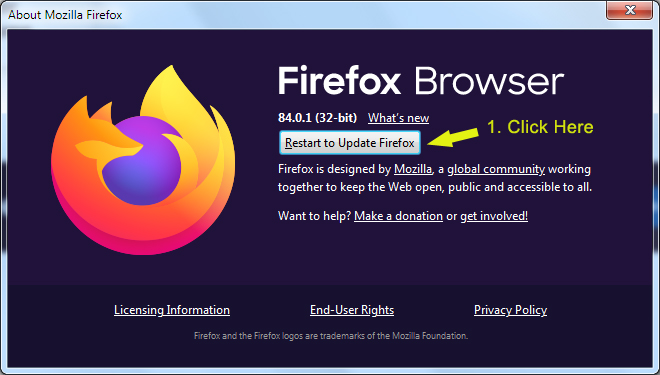
My Firefox 84 is now in an endless loop with updates.
It asked me to download an update from version 84.0.1.
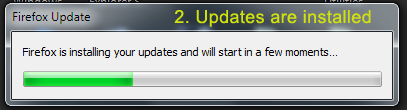
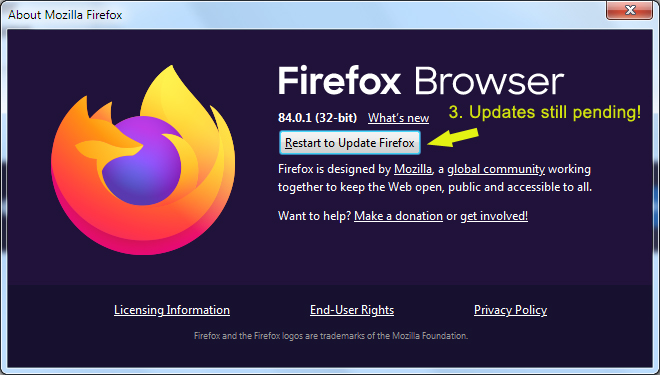
After Firefox closes, installs updates, and restarts, it comes back asking me to update again.
The cycle continues and the updates never complete.
In the Help...About box, the button is still there "Restart to Update Firefox".
I'm using 32-bit Windows 7.
Images attached.
Please advise.
Thanks!
Zgjidhje e zgjedhur
Hi, I'm not sure why that is happening, but try reinstalling: With Firefox closed, use another browser to download Firefox from https://www.mozilla.org/firefox/all/ and save the file to somewhere convenient on your computer. You can now double click the file you previously downloaded to install Firefox. (This process does not remove your Firefox profile data - such as bookmarks and passwords, since that information is stored in a different location.)
If your question is resolved by this or another answer, please help other users by marking the best reply as Solved. Thank you!
Lexojeni këtë përgjigje brenda kontekstit 👍 0Krejt Përgjigjet (1)

Zgjidhja e Zgjedhur
Hi, I'm not sure why that is happening, but try reinstalling: With Firefox closed, use another browser to download Firefox from https://www.mozilla.org/firefox/all/ and save the file to somewhere convenient on your computer. You can now double click the file you previously downloaded to install Firefox. (This process does not remove your Firefox profile data - such as bookmarks and passwords, since that information is stored in a different location.)
If your question is resolved by this or another answer, please help other users by marking the best reply as Solved. Thank you!