


How to remove the context menu on right click of min/max/close buttons?
When I right click the min/max/close buttons in FireFox it pops open a context menu. I have a different program on my machine that uses right clicks of those buttons to do things, so I want to disable FireFox handling these. How do I do so?
Zgjidhje e zgjedhur
On Windows, by default, Firefox suppresses the normal top title bar, and simulates the Windows buttons on the right end of the Tabs bar. If you enable the Title Bar on the Customize tab, then you get the title bar with its real buttons. Not sure it's worth the sacrifice of vertical space but you could try it out:
Customize Firefox controls, buttons and toolbars -- the checkbox is at the lower left
Lexojeni këtë përgjigje brenda kontekstit 👍 1Krejt Përgjigjet (5)
Isn't that the standard system menu that opens via Alt+Space ?
No, it only happens in FireFox. And the menu says "Bookmarks Toolbar" I attached a screenshot
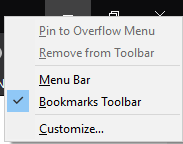
That is the standard toolbar menu. I don't think that there is a way to disable only the context menu and have the left-click still working.
Zgjidhja e Zgjedhur
On Windows, by default, Firefox suppresses the normal top title bar, and simulates the Windows buttons on the right end of the Tabs bar. If you enable the Title Bar on the Customize tab, then you get the title bar with its real buttons. Not sure it's worth the sacrifice of vertical space but you could try it out:
Customize Firefox controls, buttons and toolbars -- the checkbox is at the lower left
Ah ok. I guess it has to do that because the title bar serves as the tab bar as well. Makes sense. Guess there isn't really a way to solve it then (in the sense that I mean), but at least I know WHY it happens. I just thought it was some weird context menu thing.
Thanks a bunch!