

Windows 10 reached EOS (end of support) on October 14, 2025. For more information, see this article.

Kërkoni te Asistenca

Shmangni karremëzime gjoja asistence. S’do t’ju kërkojmë kurrë të bëni një thirrje apo të dërgoni tekst te një numër telefoni, apo të na jepni të dhëna personale. Ju lutemi, raportoni veprimtari të dyshimtë duke përdorur mundësinë “Raportoni Abuzim”.

Mësoni Më Tepër

Turning off the search functions when tyiping in adress bar

  • 3 përgjigje
  • 1 e ka hasur këtë problem
  • 8 parje
  • Përgjigjja më e re nga Happy112

më tepër mundësi

When I was typing in the adress bar, I accidentally clicked something where it brought up all of these logos of the different ways I could search (Google, Bing, Wikipedia, etc.). What was the command that made that appear and how do I turn that off?
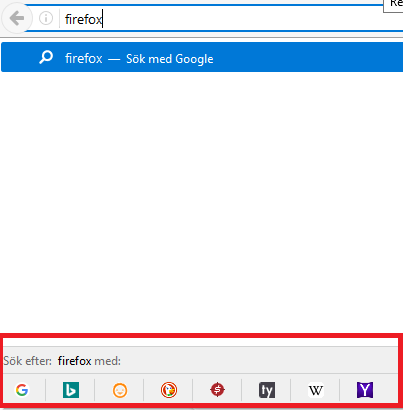
When I was typing in the adress bar, I accidentally clicked something where it brought up all of these logos of the different ways I could search (Google, Bing, Wikipedia, etc.). What was the command that made that appear and how do I turn that off?
Foto të bashkëngjitura ekrani

Zgjidhje e zgjedhur

HI   !

You can disable that feature :

Type in the address bar   about:config   (press Enter) (promise to be careful, if asked) Type and look for the preference : browser.urlbar.oneOffSearches and set its value to   false

Lexojeni këtë përgjigje brenda kontekstit 👍 2

Krejt Përgjigjet (3)

më tepër mundësi

Zgjidhja e Zgjedhur

HI   !

You can disable that feature :

Type in the address bar   about:config   (press Enter) (promise to be careful, if asked) Type and look for the preference : browser.urlbar.oneOffSearches and set its value to   false

më tepër mundësi

Thanks! While I use Firefox regularly, it never comes to my mind about the existence of the "about:config" feature.

më tepër mundësi

KalKent said

Thanks! While I use Firefox regularly, it never comes to my mind about the existence of the "about:config" feature.

Not everybody knows about it, and even then : you'd have to know which preference you need to look for ...... Glad you got rid of that nuisance, though  !
