


I have problems reading certain buttons (e.g., submit)

I am using Firefox 54 (32-bit) with the Compact Light Theme on Ubuntu 14.04.
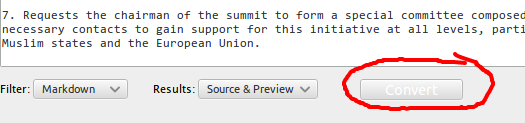
My problem is that on certain buttons, the text is too light to see. It makes it hard, especially when I am not familiar with the buttons on a site. I have tried other themes but it is still a problem.
Any ideas how to fix it?
Zgjidhja e Zgjedhur
I found the problem and the solution. I realized the problem only concerned Firefox (v54). I had just started playing around with themes after nine years of using Linux. There are some bits of info that are not clearly stated online, e.g., the GTK version that needs to be installed. I know now many of the themes have both GTK2 and GTK3 but if you try using the older ones they don't, they're GTK2 and most how-to-do-it articles don't explain that.
So, with that in mind (and thanks to James ) I switched to a GTK 3 theme for FF and all is now well.
Krejt Përgjigjet (7)
Does the problem exist when you are not using themes ?
I assume that background images are suppressed in your case. I don't know whether the compact-light theme is doing this or that you are deliberately disabling website colors.
See:
- Options/Preferences -> Content : Fonts & Colors -> Colors : "Override the colors specified by the page with my selections above"
Try "Never" if the default "Only with High Contrast themes" isn't working.
Pkshadow said
Does the problem exist when you are not using themes ?
Yes.
cor-el said
I assume that background images are suppressed in your case. I don't know whether the compact-light theme is doing this or that you are deliberately disabling website colors. See:Try "Never" if the default "Only with High Contrast themes" isn't working.
- Options/Preferences -> Content : Fonts & Colors -> Colors : "Override the colors specified by the page with my selections above"
It doesn't change anything. Background images are not suppressed. It never did it until just recently. I can't think of anything I have done to change it.
FYI: I have also tried loading FF w/o extensions. No change.
I just reinstalled FF but to no avail ... the original problem still exists.
Evidently this is not an isolated problem as two others have the same problem.
Zgjidhja e Zgjedhur
I found the problem and the solution. I realized the problem only concerned Firefox (v54). I had just started playing around with themes after nine years of using Linux. There are some bits of info that are not clearly stated online, e.g., the GTK version that needs to be installed. I know now many of the themes have both GTK2 and GTK3 but if you try using the older ones they don't, they're GTK2 and most how-to-do-it articles don't explain that.
So, with that in mind (and thanks to James ) I switched to a GTK 3 theme for FF and all is now well.