


Things not displaying properly on firefox

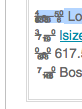
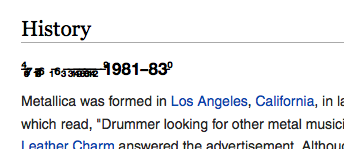
Some icons and characters don't display properly on firefox. Works fine on Chrome or safari.
Please see screenshot
Running osx 10.9.5

Zgjidhja e Zgjedhur
Have you checked out the links I posted?
Start Firefox in Safe Mode {web Link} by holding down the <Shift>
(Mac Options) key, and then starting Firefox. Is the problem still there?
Krejt Përgjigjet (7)
Please see attached screenshot. Sorry previous attachment didn't go through properly
Type about:preferences#content<enter> in the address bar. Across from fonts and colors, press the Advanced button. On the bottom, turn on Allow Web Sites To Choose Their Own.
You can check for corrupted and duplicate fonts and other font issues: http://www.thexlab.com/faqs/multipleappsquit.html - Font Book 2.0 Help: Checking for damaged fonts http://www.creativetechs.com/iq/garbled_fonts_troubleshooting_guide.html
wikipedia website as well. Seems only titles are bad.
Allow Web Sites To Choose Their Own is turned on, still the same
Zgjidhja e Zgjedhur
Have you checked out the links I posted?
Start Firefox in Safe Mode {web Link} by holding down the <Shift>
(Mac Options) key, and then starting Firefox. Is the problem still there?
Thanks guys! Its finally Fixed!
I eventually got it fixed by clearing font cache with FontNuke!
That was very good work. Well Done.