


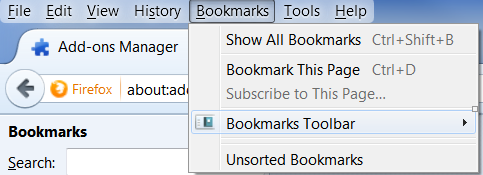
User can't save or import bookmarks in windows 7 PC. How do I make this tiny little white box in front of the bookmarks drop-down go away?

The user is running 33.01 on a Windows 7 PC. He can't add or import bookmarks using any of the known methods. Even if he logs into his Firefox Sync his bookmarks don't appear. Also there is a weird little white box over the Bookmarks Toolbar that kinda looks like a popup or an ad but it doesn't do anything if he clicks on it and the Bookmarks Toolbar drop-down menu doesn't appear. I've tried uninstalling and reinstalling Firefox multiple times without any change or success. I checked to see if there were any extensions causing it but there aren't any installed. Also his bookmarks do sync using Firefox Sync on other computers.
Krejt Përgjigjet (2)
Here is what the tiny box looks like that I was talking about.
You can check for problems with the places.sqlite database file in the Firefox profile folder.
- http://kb.mozillazine.org/Bookmarks_history_and_toolbar_buttons_not_working_-_Firefox
- https://support.mozilla.org/kb/Bookmarks+not+saved#w_fix-the-bookmarks-file
- Places Maintenance: https://addons.mozilla.org/firefox/addon/places-maintenance/