Saving a bookmark into imported bookmark folders

I imported my old bookmarks from Internet Explorter and placed the folders contained within onto the top bar of Firefox (whatever it's called). I then tried to save a new bookmark into one of those folders but can't see the option anywhere! I've tried everything, including searching through the "Display your Bookmarks" dropdown but can't see my imported folders anywhere. They have a complicated structure and I don't wan't to spend loads of time creating new ones. Can you help please?
Krejt Përgjigjet (1)
Zgjidhja e Zgjedhur
When you use the Library dialog (Ctrl+Shift+b) you will see there are three top-level "containers" for bookmarks:
- Bookmarks Menu
- Bookmarks Toolbar
- Unsorted Bookmarks
Where did you put your imported bookmarks?
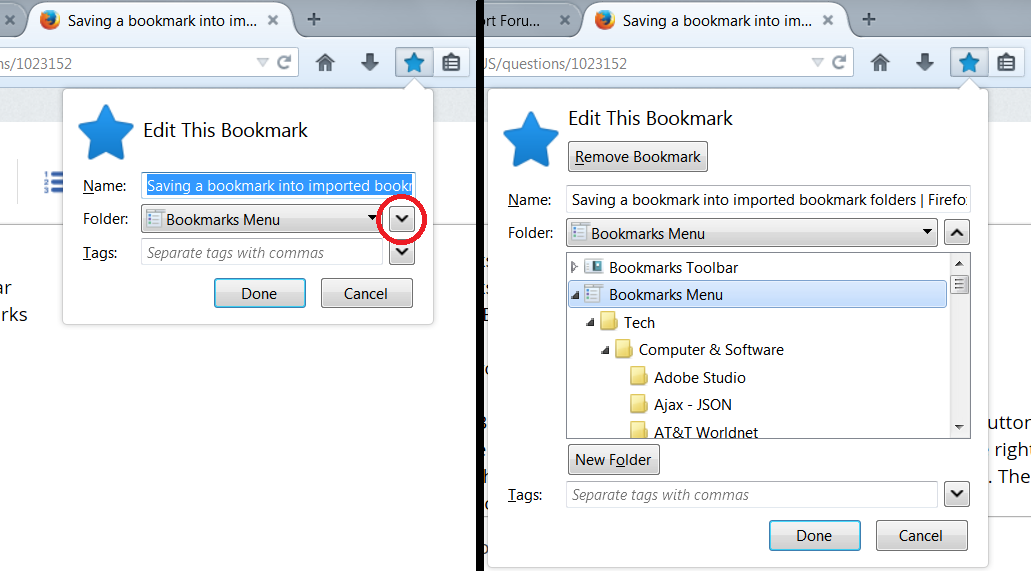
In the Add Bookmark/Edit Bookmark dialog, there are two lists: the button showing the most recently used folder, and the smaller button to the right of that which expands the dialog to let you view the full list of folders. The second button probably will be more useful to start. (Screen shot attached)