


TBird stopped working on one computer, not the other, all settings the same.

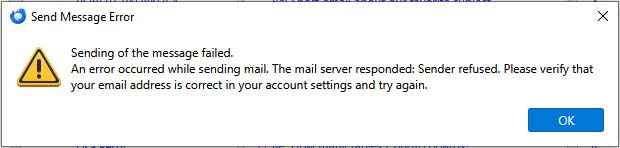
My two Optimum email accounts (POP3) stopped sending messages. See attached error message. They are still working on a different computer with the exact same settings and Thunderbird version (Windows 10 on both too). I also have Outlook and Gmail accounts all still sending fine. Sending from troubleshooting mode and clearing the startup cache didn't help. Any clues what I can try?
All Replies (3)
My guess is your PC is actually attempting to use the same SMTP server for both accounts. This is a common problem but easily fixed. Try this:
- click to account settings pane
- highlight the account that does not send
- look in lower right where there is a button that says something such as 'edit SMTP server. CLick it and see if it is the correct email id. My guess is it is the email address of the other account, DO NOT change it because the other account uses it. Instead, on the same pane with the 'edit SMTP server' button, to the left of the button is a dropdown menu Click that and you should see all SMTP servers listed. find yours and set it for the account. If you have problems, post back.
Hi. Thanks for replying. I found the "Edit Outgoing Server" button - was that it? The usernames on both Optimum accounts look fine. And both Optimum accounts can not send (but they receive fine).
To make things more frustrating, I copied the entire Thunderbird folder to another computer. It worked fine on that one - the mail sent from the optimum account. I cleaned up the mail boxes a little (to reduce the size of the profile), then moved it back to the other computer. It failed again. Optimum sends on one computer but not the other, and they are using the same profile folder. Could the Optimum mail server be using the IP address to block me sending mail from that specific computer?
I am totally surprised. If you were blocked, there would normally be an error message. The accounts don't work on one PC, you copy the profile to another PC and they work Puzzling.. Is the error message the same as before? We're probably overlooking something really simple.