


Imcoming emails are not displayed correctly and links don't work.

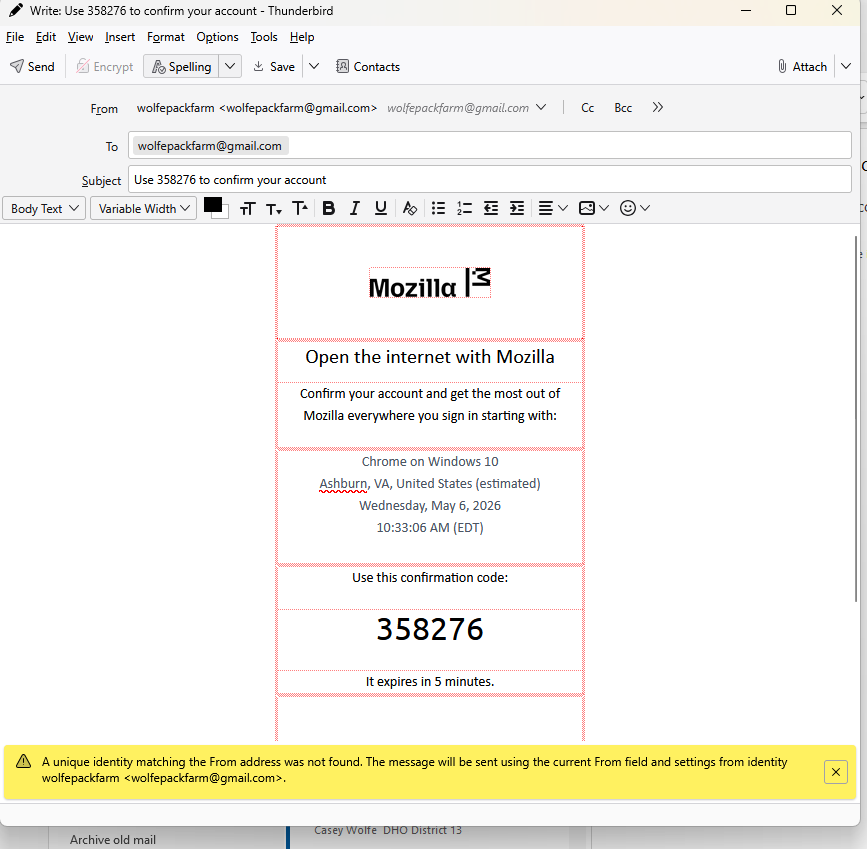
Hi. I have four gmail accounts and use a desktop pc runnings windows 11. I have been using thunderbird as my desktop email client for many years, but recently, something has changed. My incoming emails are not formatted correctly and the links in them do not work. I'm not sure I am saying that correctly, so I will attach a screenshot. I would love some advice on how to fix this! Thanks, Cheryl
Chosen solution
Me again! Your messge pointed me in the right direction and I have fixed this issue. My inbox was flagged as an inbox and draft folder. I used flag folders addon to remove drafts. Then I went to account settings - copies and folders and made sure that my drafts were being kept in the draft folder. I restarted and all is back to perfect - for now:) Thanks for your help. Cheryl
Read this answer in context 👍 0All Replies (5)
That screenshot's error message usually appears when you take a message you received from someone else (in this case, Mozilla) and click to 'edit as new.'
Hi David. I didn't click anything. The mozilla email came into my inbox and I opened it to read it - and that is how it displayed. I also notice, now, that it appears as if it opened so that I could replay to it, not just read it. Notice that at the top of the email, it shows my own email address inboth the to and from fields. If "click to edit"is turned on somehow, how do I turn it off. Thanks for your help! Cheryl
Chosen Solution
Me again! Your messge pointed me in the right direction and I have fixed this issue. My inbox was flagged as an inbox and draft folder. I used flag folders addon to remove drafts. Then I went to account settings - copies and folders and made sure that my drafts were being kept in the draft folder. I restarted and all is back to perfect - for now:) Thanks for your help. Cheryl
Okay. You're stating that when you open mail, it appears in the compose screen. I am clueless on such a situation. My suggestion is to click help>troubleshootmode and restart. If the problem disappears, the issue may have been some addons gone awry. If the problem persists,I suggest disabling your antivirus for a check. Have you recently updated thunderbird? Click help>about and check your release version. Then, go to https://www.thunderbird.net/en-US/thunderbird/all/ and download the same version. Shut down thunderbird and install the replacement over the top of it. Restart and let me know.
'Thanks for the feedback. It certainly seemed a weird problem. :) I'm glad all is well.