


SMTP configuration

I have been using Thunderbird with two POP3 Hotmail accounts for some time and I am trying to set up a third account with exactly the same configuration. However, both the automatic and the manual configurations failed. The new account receives mail, but the outgoing smtp server config seems to have a problem. Sending messages times out or keeps prompting for a new password.
The Hotmail account has POP3 and IMAP enabled. Thunderbird is set to receive all cookies. I cleared history and cache after every attempt and also temporarily disabled the firewall.
Any suggestions about what the problem could be?
All Replies (17)
Thank you Matt. I tried that already, but it does not make any difference. Still unable to send mail on this new account, while the other two work perfectly.
Modified by CGV
well can you show the eror report you get when sending the email and your current SMTP configuration that got the ewrrors (not the new account wizard)
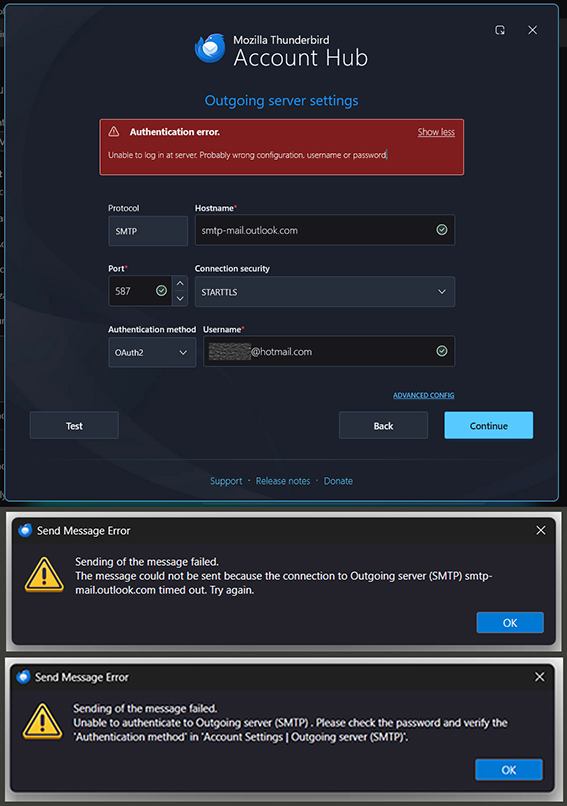
You find a screenshot of my smtp config and both the error messages above. It is all still the same.
CGV said
You find a screenshot of my smtp config and both the error messages above. It is all still the same.
I said
Matt said
(not the new account wizard)
The first image is the new account wizard, not your current SMTP settings, at that point nothing has been written to the actual account settings I asked you to post.
Go to account settings open the entry of outgoing server (SMTP) and had a look at the settings there. Those are the settings that generated the next two errors in your image. Not the account hub, it is trying to add the account again.
Until we can get to your current settings and start correcting them nothing is going to happen.
Well, here is another screenshot. The settings are definitely what they are suggested to be. During setup I get the authentication window to log into the Hotmail account. It closes without any error message. The result is that I am able to receive, but not to send any messages. I also tried the outlook.office365.com option. And by the way, my Hotmail account has no 2-factor auth activated and pop3 is on.
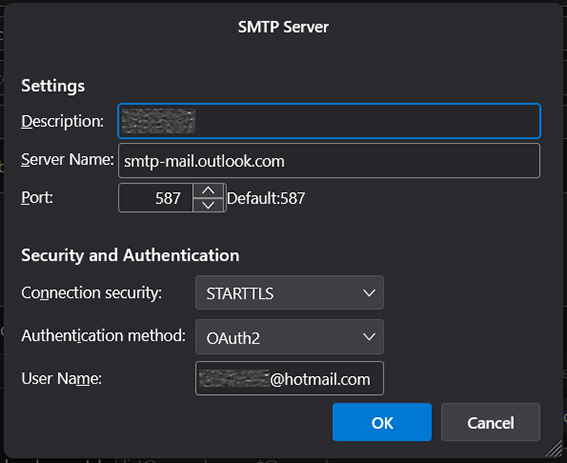
re : The new account receives mail, but the outgoing smtp server config seems to have a problem.
Microsoft Account considers all it's email addresses as 'alias'. You say you have more than one hotmail account. In the Microsoft Account accessed via abrowser, One of the email address will be set up as 'primary'. Microsoft will only allow sending via smtp in Third party email client using whatever is set up as the 'primary' account. Ideally, set up all passwords for all accounts to be the same as the 'Microsoft Account password.
So, for that additional hotmail, set up the outgoing smtp to use the 'primary' email address as username and also set the 'password' to be whatever is set for the 'primary' email address.
Then once account is set up, access the Account SEttings and select name of account - enter the email address of the account into the 'Reply-to Address', so regardless of what is used to send, the reply should come back to correct email address.
Modified by Toad-Hall
Thank you for your suggestion. I figured that it might have to do with one of those weird Hotmail settings. Meanwhile, I shut down one of the Hotmail accounts, which was obsolete, and deleted it from Thunderbird. So there are only two accounts left: The new one, which is set as default (primary) and the remaining old one as secondary, but this one still has an active Office subscription which expires in four days from now. Both accounts use the same password. According to your explanation, I replaced the smtp username of the secondary (old) mail with the username of the primary (new) default mail account.
I also tried it the other way, leaving the old account as default and replacing the smtp username of the new account instead.
None of both options worked, I only get an error message that hotmail #1 is not allowed to send through hotmail #2, which sounds logical to me. Is it possible that the still active Office subscription interferes in some way?

You can try smtp.office365.com as outgoing server, that works for me, with an old hotmail.nl account.
I also cleared all data logged by both Hotmail accounts under Privacy. Thereafter, Thunderbird opened the auth browser window for each account, prompted to enter the account passwords again and to allow access. So far everything seems to be normal, but the smtp problem still continues.
In your 22-03-2026, 00:39 message you mentioned outlook.office365.com, I suggested to try smtp.office365.com.
Thanks again, I tried that one, too. Makes no difference. The one suggested in the Hotmail settings however is smtp-mail.outlook.com, but all of them return the same smtp error.
CGV said
Thank you for your suggestion. I figured that it might have to do with one of those weird Hotmail settings. Meanwhile, I shut down one of the Hotmail accounts, which was obsolete, and deleted it from Thunderbird.
Confirm you also removed the saved passwords for incoming and outgoing from Thunderbird via Settings > Privacy & security > Saved Passwords After removing all lines for the account you removed - Exit Thunderbird, wait a moment then restart Thunderbird.
So there are only two accounts left: The new one, which is set as default (primary) and the remaining old one as secondary, but this one still has an active Office subscription which expires in four days from now. Both accounts use the same password. According to your explanation, I replaced the smtp username of the secondary (old) mail with the username of the primary (new) default mail account.
As far as I'm aware, for third party email clients, Microsoft will only allow sending via whatever email address has been set up as 'primary'. So if the new one has been set as primary in Microsoft Account then that would be the 'username'/email address to use in smtp settings when sending for both hotmail accounts.
But I just had a thought - Did you do it this way?
- In Account Settings
- Left pane - scroll to bottom and click on 'Outgoing Server (SMTP)' to see the list of outgoing smtp servers.
You will only need the one smtp server for hotmail. So just edit one of them.
- Select hotmail smtp and Click on 'Edit'
- Type this in Description: hotmail primary
- Make sure the 'username' = primary hotmail email address.
- click on 'OK'
Then make sure both hotmail accounts are actually using it.
- In Left pane select name of hotmail account and look bottom right for it's 'outgoing server SMTP'
- It should say 'hotmail primary' because you typed it in Description.
- DO NOT click on the 'EDIT SMTP_Server' button because you could end up altering the wrong one.
- If it does not say 'hotmail primary', click on the drop down chevron to see frop down list and then select the 'hotmail primary' one.
- Do this for both hotmail accounts.
Then Exit Thunderbird and wait a few moments for background processes to complete - Restart Thunderbird.
I also tried it the other way, leaving the old account as default and replacing the smtp username of the new account instead. None of both options worked, I only get an error message that hotmail #1 is not allowed to send through hotmail #2, which sounds logical to me.
It is logical for just about any server. Generally, you have one smtp per account/email address. But not with Microsoft Accounts. They altered things not too long ago probably in an attempt to force people to use the webmail account. I've managed to get several people up and running again, by telling them about Microsoft only allowing smtp sending via whatever is set up 'primary' alias in Microsoft Account.
Is it possible that the still active Office subscription interferes in some way?
Good point. I did locate this info which mentions users with 'paid Microsoft 365 subscriptions'. Microsoft made changes to its email services on September 16th, 2024. They ended support for SMTP on free accounts, which means users with free Microsoft accounts can no longer use SMTP to send emails through third-party apps or devices. This change primarily affects users who rely on email clients or devices that use SMTP for sending emails. Meanwhile, Microsoft 365 accounts are not affected by this change. Users with paid Microsoft 365 subscriptions can continue to use SMTP as usual.
But smtp should be using Office 365 SMTP settings
- Description: full email address
- Server name: smtp.office365.com
- Port: 587
- Connection Security: STARTTLS
- User Name: full email address
- Authentication Method: OAuth2
Thanks again for taking your time to post a very detailed explanation. Yes, I also removed the saved password for the deleted Hotmail account.
The remaining two email addresses are not aliases within the same Microsoft account, we are talking about two independent accounts. In the original Thunderbird configuration I had the primary (the one with the active Office subscription) and the secondary (now deleted), both were able to send with the same smtp settings without any problems, though only one of them had a linked MS365 subscription. Furthermore, how would I let Microsoft know, which of the two accounts should be considered as "primary"?
Setting the primary Hotmail address as smtp username for both accounts failed.
As it seems, this whole problem is nothing else than a dirty trick by Microsoft to tie their subscribers to MS365, if they want to keep using their SMTP access. I didn't actually intend to renew my subscription, as there are better, free Office solutions available. However, taking into consideration that I was still able to send emails from the old, meanwhiles deleted account, even though it wasn't linked to MS365, what do you think happens, if I sign up again for another subscription with the new email address? Could I expect that the primary (new) account then works with Thunderbird smtp? I could cancel the subscription again after a month or two. Can I assume that after this procedure both accounts — the primary one (with the new MS365 subscription) and the secondary one (with the expired MS365 subscription) — will work with SMTP again?

I am having the same problem as CGV.
Trying to add a hotmail email account to Thunderbird and I can receive email but not send it.
I tried the hotmail email in the Outlook app on the laptop and it sent and received perfectly. Thunderbird runs better than Outlook on the laptop I am using.
Also on the Outlook website the email sends and receives perfectly.
There is only 1 hotmail email address in my Thunderbird on the laptop.
I have also added the email address to my desktop computer and it can receive but not send. I have multiple accounts on my desktop. 3 of which are hotmail including the one I am having trouble with.
2 hotmail email addresses work perfectly on the desktop thunderbird but the outlook one doesn't.
The laptop is Windows 10 and the desktop is Windows 11.
Modified by AndrewJ.
As it seems, we are pretty much left on ourselves with that issue. If Microsoft does not respect their users and plays tricks on them, well, I guess then it is about time to get rid of Microsoft. Ever thought about switching to a different OS?