


Restore lost email folders & subfolders

Hi, About a week ago I tried to access my email in Thunderbird and got no result. After doing some research I decided to follow some advice to delete my 2 Thunderbird accounts and then recreate them as 2 new accounts. I then discovered that many of my saved email folders and subfolders were missing. Is there some way to restore these folders & subfolders? Also, is there some way the restore a folder and all of its subfolder at once rather than having to restore each subfolder individually before restoring the main folder?
All Replies (7)
If the accounts were POP accounts, you may have deleted the messages permanently. You need to provide more info on the account details.
Hi David, they are POP accounts but I can see many of the emails in my Thunderbird Inbox. I can also see most of the missing emails in pop.gmail-1.com. My problem is restoring the missing emails in Thunderbird, specifically so that I can restore a folder and all of its subfolder at once rather than having to restore each subfolder individually before restoring the main folder
Please post screenshot of the pop.gmail-1.com folder. I presume this is one of the deleted accounts?
Please post screenshot of the pop.gmail-1.com folder. I presume this is one of the deleted accounts?
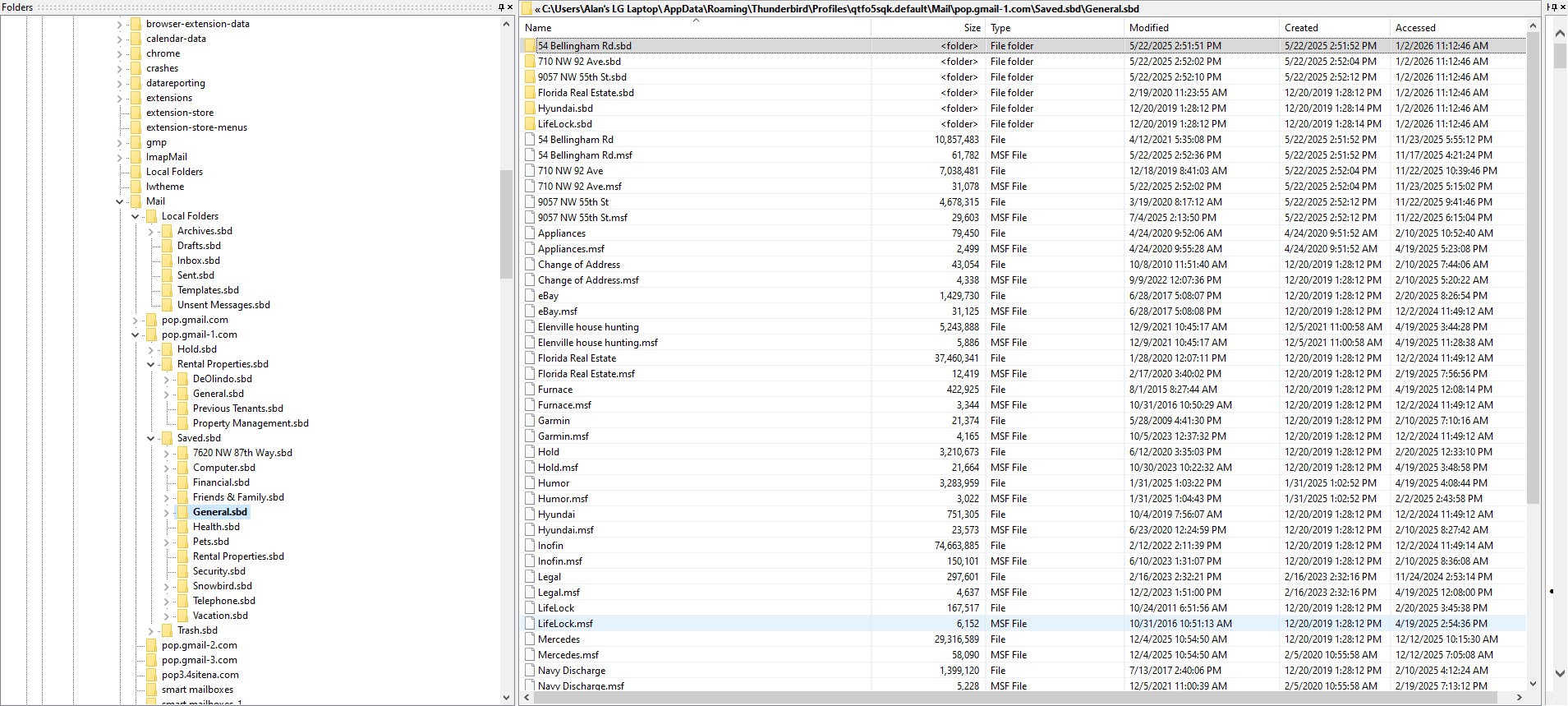
OK, we're lacking a few pieces of info. I presume that pop.gmail.com is the actual account? Not knowing your account structure, my idea would be to - exit thunderbird and create backup of profile - just in case something goes wrong. - now, in the profile, COPY (not move) the complete set of folders and paste into the desired account folder. - then start thunderbird and assess status.