


Windows 10 reached EOS (end of support) on October 14, 2025. For more information, see this article.

Search Support

Avoid support scams. We will never ask you to call or text a phone number or share personal information. Please report suspicious activity using the “Report Abuse” option.

Learn More

Bookmarks menu

  • 1 reply
  • 0 have this problem
  • 27 views
  • Last reply by Denys

more options

Hello

After a recent update, the bookmarks menu changed—when you click a certain line, it glows bright blue. I understand this is for ease of use while using bookmarks, but I'm used to leaving this menu open all the time, and after these changes, the blue glow is very distracting.

In light of this, I'd really like to know how to restore the old display, or, if that's not possible, I'd like to see special personalization settings for this type of thing in future updates.
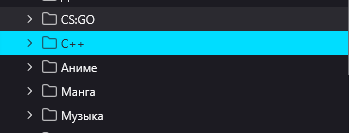
Hello After a recent update, the bookmarks menu changed—when you click a certain line, it glows bright blue. I understand this is for ease of use while using bookmarks, but I'm used to leaving this menu open all the time, and after these changes, the blue glow is very distracting. In light of this, I'd really like to know how to restore the old display, or, if that's not possible, I'd like to see special personalization settings for this type of thing in future updates.
Attached screenshots

All Replies (1)

more options

Hi there,

Thank you for reaching out! This issue is tracked under bug 2005430. Currently, the plan is to switch to a softer color.

Regarding your suggestions, this forum is not the right place, but please feel free to share them on Mozilla Connect. The feedback there is collected by a team that reads it and gathers data on the most common issues.

Ask a question

You must log in to your account to reply to posts. Please start a new question, if you do not have an account yet.