


Firefox

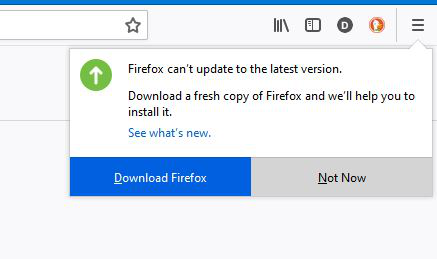
No matter how may times I have tried to download a new copy of Firefox I get the same result constantly. Can you help please?
Thank you.
(See atached screen copy)
All Replies (6)

Did you use this link; http://www.mozilla.org/en-US/firefox/all/
Fred. Thank you for trying to help. I have used thr link supplied in your reply but I still have the same problem.

1) What is your current version of Firefox? 2) Your OS version? 3) Did the installation go OK from the setup file you downloaded from link posted above?
You did download the installer from Mozilla, yes? What happen when you ran the installer?
Reply to Russell. Thank you for contributing...........Current version, unsure but I think the latest...............OS Win 10..............Instalattion appeared to be fine.
Reply to Fred...............Downloaded from Mozilla appeared to be fine, an icon appeared on my desk-top. FireFox runs OK for a while then I get the messsage as discussed. I can delete it but I woooonder if my version is up to date.
Thank you both for your attention.
Reboot the computer.