


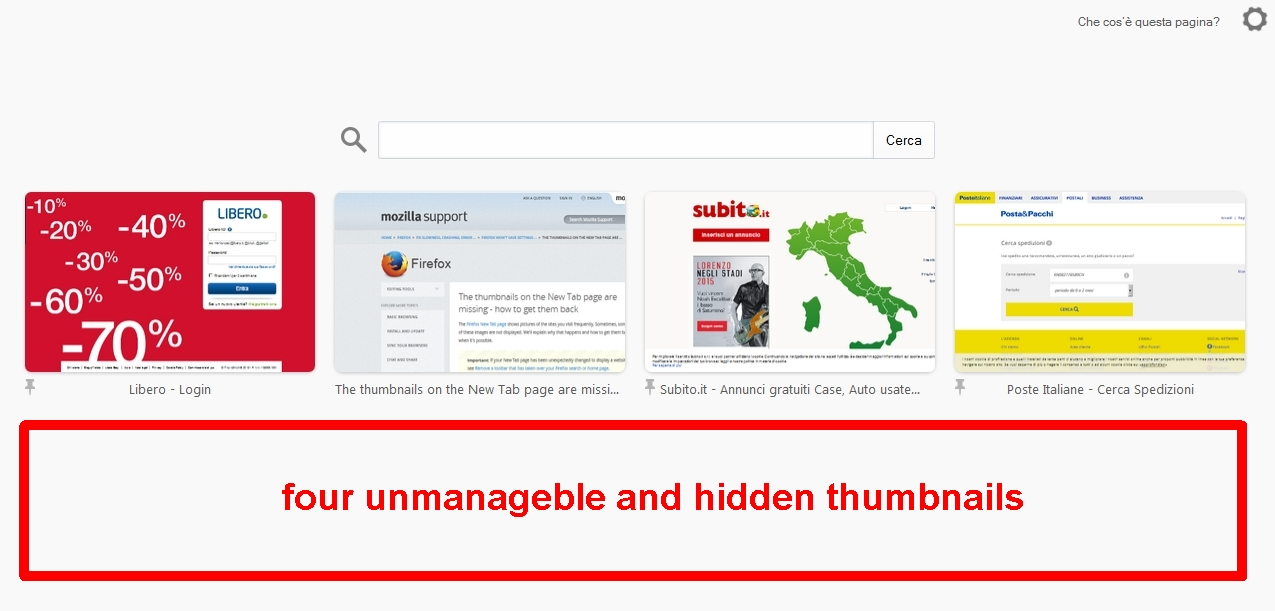
half new tab (thumbnails missing over different profiles)

about https://support.mozilla.org/en-US/kb/thumbnails-new-tab-page-missing-how-get-them-back
I follwed the procedure but, unfortunately, I didn't wait for the end reload page, and now I see the upper half page visible and the lower half page hidden, without frames/thumbnails visible. However, dragging the thumbnails I can see all of them 8 and I can also move them, but when released the dragging, the lower 4 frames/thumbnails again become hidden. the profile is new, I restored bookmarks and othere .json from last profile with the same issue. where am I wrong? how to resolve the problem? thanks.
Chosen solution
I resolved it. it was a simple issue of magnifier, zoom, CTRL+ CTRL-
Read this answer in context 👍 0All Replies (2)
see picture attacched
http://s16.postimg.org/q0o4azs3p/capture_001_20150704_114234b.jpg

Chosen Solution
I resolved it. it was a simple issue of magnifier, zoom, CTRL+ CTRL-