


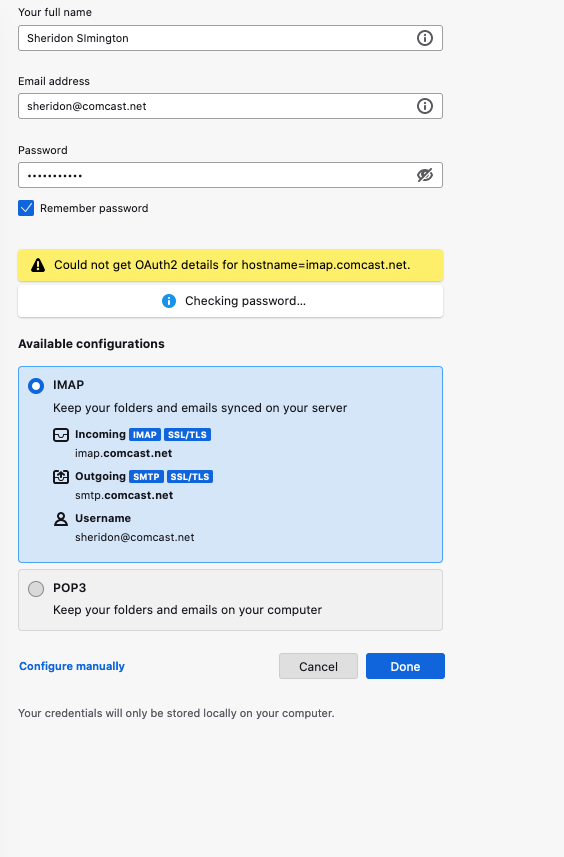
Could not get OAuth2 details for hostname =imap.comcast.net

Trying to install an older vesion of Thunderbird, but keep getting this error: Could not get OAuth2 details for hostname =imap.comcast.net
Все ответы (3)

What version of Thunderbird?
A few days ago I had trouble setting up Comcast in Thunderbird 115.18.0 in Windows 7 with OAuth2. I changed the authentication method to the older, less secure "Normal Password" method, and was successful. So, try that.
I just now changed it back to OAuth2, and it worked this time! Go figure.
Thanks. Now it is saying unable to log into Server. I couldn't find the settings in Xfinity to allow 3rd parties email servers.
- What version of Thunderbird?
- What is your operating system?
- What antivirus, Internet security software, or VPN are you using, if any?
- What "3rd parties email servers" are you referring to? That implies to me that there may be a misspelling somewhere, or there's some other program on your computer (like and AV) that's interfering with the connection.
You do have to tell Comcast to "Allow access to my Xfinity Email through third-party programs." That setting at Xfinity's web mail page is found at <Email Settings (gear icon) | Security | Third Party Access Security>.
If Thunderbird can't automatically detect the proper server settings, you should be able to manually enter the correct settings. Here are my working Comcast settings:
MAP (Incoming): Incoming Server Type: IMAP Mail Server Incoming Server Name: imap.comcast.net Port: 993 User Name: <my email address> Connection Security: SSL/TLS Authentication method: Normal Password OR OAuth2
SMTP (Outgoing): SMTP Server Name: smtp.comcast.net Port: 465 Connection Security: SSL/TLS Authentication method: Normal Password OR OAuth2 User Name: <my email address>