Delete email from it's notification window?

When I have Thunderbird desktop running but I am focused in another application, I receive a popup notification when a new email is received. In the popup, there is an X to make the notification disappear, but it would be very handy if there was also a trash can icon where, if you clicked on it, the message would be deleted from your inbox without having to go back to the TB app. I didn't see any such options in TB settings, and I have searched the forum to no avail. Is this possible? Thank you.
Выбранное решение
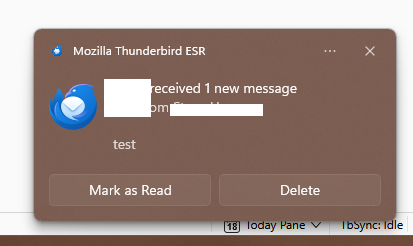
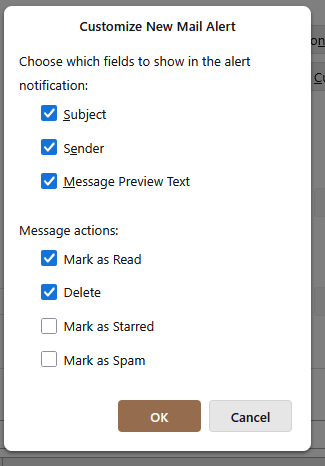
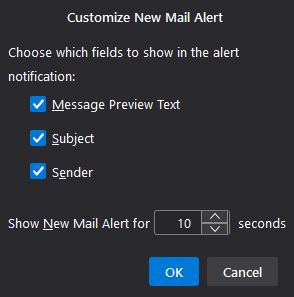
I just tested with TB 140 ESR (see picture). Your Customize window appears to be missing some settings (2nd picture). Try in Help/Troubleshoot Mode. Confirm you're using TB 14x.
Прочитайте этот ответ в контексте 👍 0Все ответы (4)
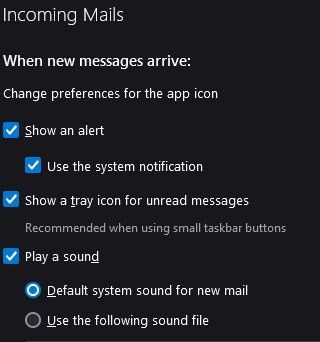
This works now but only if 'Use the system notification' is enabled in Settings/General/Incoming Mails.
I appreciate the response. I do have this setting enabled, as well as all options in the Customize New Mail Alert. No option to delete email. Pleas see attached screen shots. Thanks.
Выбранное решение
I just tested with TB 140 ESR (see picture). Your Customize window appears to be missing some settings (2nd picture). Try in Help/Troubleshoot Mode. Confirm you're using TB 14x.