


Windows 10 reached EOS (end of support) on October 14, 2025. For more information, see this article.

Поиск в поддержке

Избегайте мошенников, выдающих себя за службу поддержки. Мы никогда не попросим вас позвонить, отправить текстовое сообщение или поделиться личной информацией. Сообщайте о подозрительной активности, используя функцию «Пожаловаться».

Подробнее

Fonts too small on sidebar & in drop downs

  • 2 ответа
  • 0 имеют эту проблему
  • 34 просмотра
  • Последний ответ от sheila

дополнительные действия

DAM SERVER ERROR! Every thing I wrote here is now GONE! Is it possible to make sidebar & drop down list LETTERS LARGER? The're tiny, too small to see without he magnifyer. Shrinking the page has no effect on the sidebar or the drop downs which stay tiny I cannot see tiny letters, I have to use the magnifier to see them & that is very awkward.
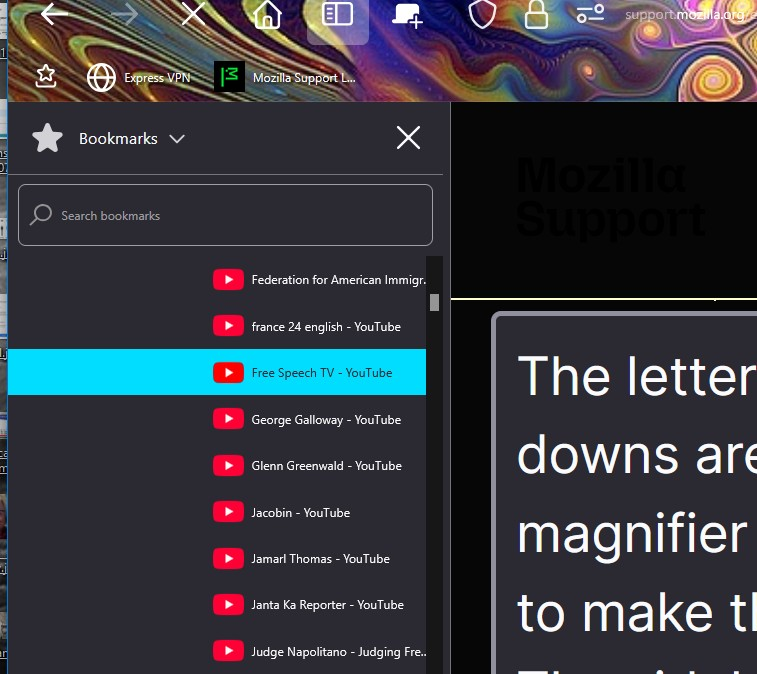
DAM SERVER ERROR! Every thing I wrote here is now GONE! Is it possible to make sidebar & drop down list LETTERS LARGER? The're tiny, too small to see without he magnifyer. Shrinking the page has no effect on the sidebar or the drop downs which stay tiny I cannot see tiny letters, I have to use the magnifier to see them & that is very awkward.
Приложенные скриншоты

Выбранное решение

Hi,

The people who answer questions here, for the most part, are other users volunteering their time (like me), not Mozilla employees or developers. If you want to leave feedback for developers, you can go to the Firefox Help menu and select Share ideas and feedback…. Alternatively, you can use this link. Your feedback gets collected by a team of people who read it and gather data about the most common issues.

You can also file a bug report or feature request. See File a bug report or feature request for Mozilla products for details.

Прочитайте этот ответ в контексте 👍 1

Все ответы (2)

дополнительные действия

Выбранное решение

Hi,

The people who answer questions here, for the most part, are other users volunteering their time (like me), not Mozilla employees or developers. If you want to leave feedback for developers, you can go to the Firefox Help menu and select Share ideas and feedback…. Alternatively, you can use this link. Your feedback gets collected by a team of people who read it and gather data about the most common issues.

You can also file a bug report or feature request. See File a bug report or feature request for Mozilla products for details.

дополнительные действия

dam my reply was deleted, I gropped around & found a fix for the tiny works on the sidebar tools-acessability-custom size-display scale-200% now I can see what's on the sidebare, I know your all volunteers & I thank all of you for your help. I'm alsmost blind so doing anything on the puter is very hard. thanks again for your work and dedication, sheila

Задать вопрос

Для ответа на сообщения вы должны войти в свою учётную запись. Пожалуйста, задайте новый вопрос, если у вас ещё нет учётной записи.