


Round corners disabled
It really irritates me whenever i use youtube, facebook and other kinds of websites. The missing of the round corners makes the whole page sucks and ugly. I tried updating firefox, checked my settings, nothing changed. Is there a way to fix this?


Все ответы (6)
It should have round corners... Is it a high contrast theme?
why is it all about themes i dont get it tbh. i used firefox with my theme long ago and it still have the round corners. until when i updated firefox for more than 1 month ago it starts being like this
Try updating your graphics drivers from the manufacturer's site and if that doesn't make any difference you may need to disable hardware acceleration.
What is your GPU and driver version reported in about:support#graphics?
Start Firefox in Troubleshoot Mode to check if one of the extensions ("3-bar" menu button or Tools -> Add-ons -> Extensions) or if hardware acceleration or if userChrome.css/userContent.css is causing the problem.
- switch to the Default System theme: "3-bar" menu button or Tools -> Add-ons -> Themes
- do NOT click the "Refresh Firefox" button on the Troubleshoot Mode start window
@zeroknight this is the report
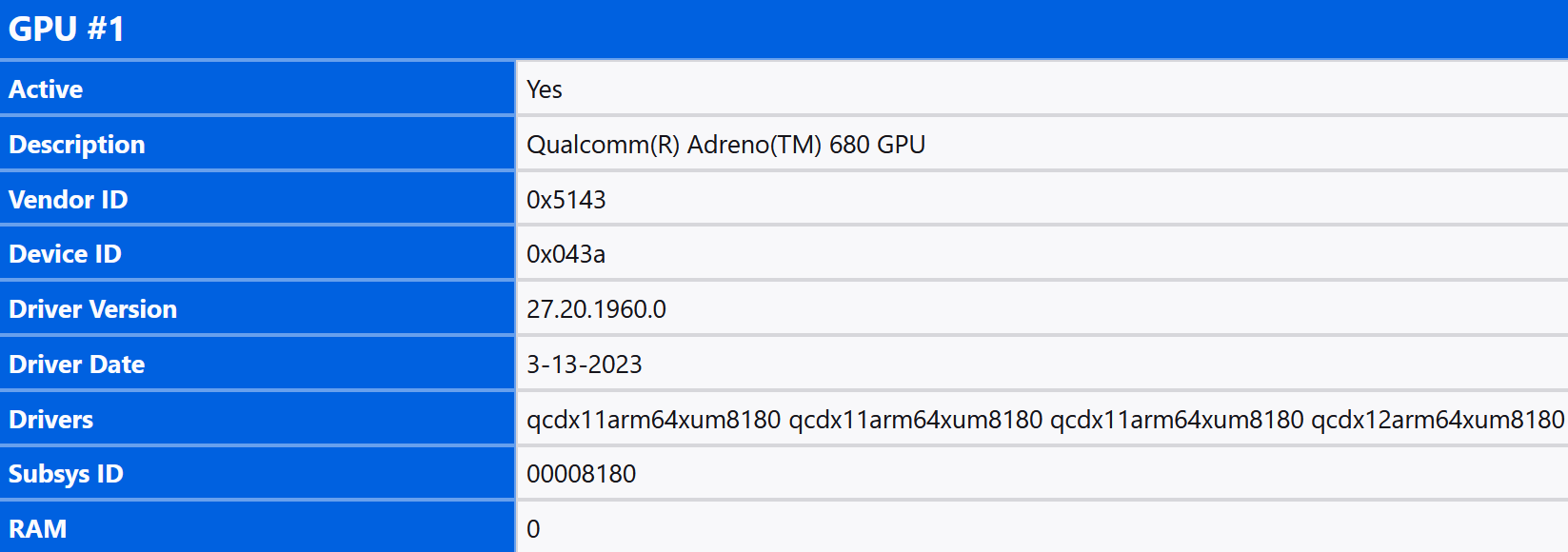
Oh, it's qualcomm gpu. Could you try setting gfx.webrender.debug.disable-batching to true in about:config, then restart, and see if that helps?