


After every update Firefox uninstalls itself.

Hi, after every update, Firefox disappears and uninstalls itself.
Toate răspunsurile (19)

You say 'uninstall' how do you confirm that. Is there no entry in the Windows Start/Programs menu?
have you checked C:\Program Files\Mozilla Firefox to see if there is a [firefox.exe] there.
If there is click on it and see what happens. If it works you can make a short cut to your desktop.
Hi amoun, I sent a reply but Mozilla says there is a problem ??
Here we go again..... Hi amoun, Firefox tells me there is an update. I click on it and after some time, there are usually two pages forming and one tells me about "something new" on Mozilla. Than I wait and wait and after some time try to go back to the site I was working on, but the page goes blank and I can't get out of it. Than the message comes: Firefox is not responding. Do you want to close down Firefox ? I click Yes and notice that Firefox has been uninstalled. I than download and re-install Firefox and everything is back to normal.
Yes and notice that Firefox has been uninstalled.
But has it? I.e. did you check C:\Program File\Mozilla Firefox
Yes, Firefox was missing in the Programs
https://support.mozilla.org/en-US/questions/1173015
Are the updates Automatic or are you prompted to update, ie you do not manually update via a download.
You may 'have/want' to use regedit to remove all registry entries in Windows for Mozilla Firefox
When I am using Firefox and I see an update, I click on it and that was never a problem until some weeks back. I used my favourite site on Facebook , so when I switched on Firefox Facebook would start up. The first update after that Firefox started to give the problems as explained.
Two more thoughts. One, I like to stay away from the Registry since I am not experienced enough and Two: if I ignore the manual update, the problem might stay away.
OK
Where do you download from? Do you use the msi version?
https://www.firefox.com/en-US/releases/
A general search uses location etc. so I get this https://www.firefox.com/en-GB/download/windows/ but this is not the msi version.
So do you set a place to install it manually or accept the default. i.e. how about choosing a different place/folder to install it?
Hi amoun, I use Microsoft Edge to download a shortcut to download Firefox. After the download and install, everything works normal as before. I am not an IT person and can't respond to some of your questions.
OK If you look at the short cut name, maybe via right click > Properties does the name have msi in it.
Secondly when you install are you aware of a choice where to install it. it does tend to lead to an auto place.
Have a look at this guide
https://support.mozilla.org/en-US/kb/deploy-firefox-msi-installers
What I am hoping is that a more chosen place for install may circumvent any existing Windows conflicts.
The [regedit] option is a bit of a chore and risk
If you're facing repeated issues with installation and updates, you can also have Firefox installed from Microsoft Store — which will take care of its location and updates for you. See Download Firefox on Windows from the Microsoft Store
Hi amoun and jbr, I think now that I am the cause of the Firefox problems myself. I have been using Firefox for some 30 years without any problems. The problem started some months ago when Firefox offered the option of starting up with my favourite site which is Facebook. Since that time I am using Firefox in a different way. Before the change, when I was finished working on the computer, I got out of Firefox and put the computer to "sleep". In the last months, I have switched on the computer, Firefox comes on with the login page of Facebook, I login and start working. Than a message comes on that there is a new version of Firefox and I click on it and there is where the problem seems to be.
Interestingly your copy, according to the data submitted here, is up–to–date … so there's no reason an update should be nagging you for attention.
Just to be on the safe side, could you take a screenshot of the message and attach it here, to rule out it's not coming from Firefox, but it's some third–party scam?
Hi jbr, taking a screenshot is new terrain for me. Not sure which message you mean.
You're describing an update prompt that causes trouble. We might need to see it. How do I create a screenshot of my problem?
Does it look like this, within Firefox, or you're facing something else per se?
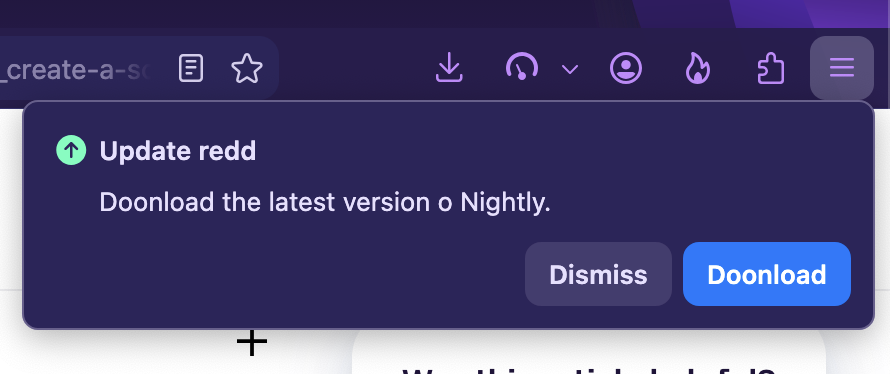
Hi jbr, I probably need a new "update" before I can take a screenshot of the problem. Since the computer is frozen a screenshot might not work. I have to wait for the message: Firefox is not responding and: Do you want to delete Firefox ? After deleting does a screenshot make sense ?
Use phone camera if necessary — the message with deleting the browser sounds quite off. That might be coming from the system — I'll leave that to Windows experts however, where that might be coming from.
Hi jbr, I think my priority is to go back to use Firefox like I was using before and ignoring the manual updates while I am using Firefox and Facebook. It could be that Facebook and playing "reels" on it could be a factor too. I hope that that will solve my problems. Thanks for your advice.