


I cannot access the menu bar even after reading your instructions.

I just downloaded Thunderbird on my second computer. The instructions say for new users to access the menu bar you need to right click an empty spot of the screen. I tried this, but it is not working for me. Somebody help please.
Solução escolhida
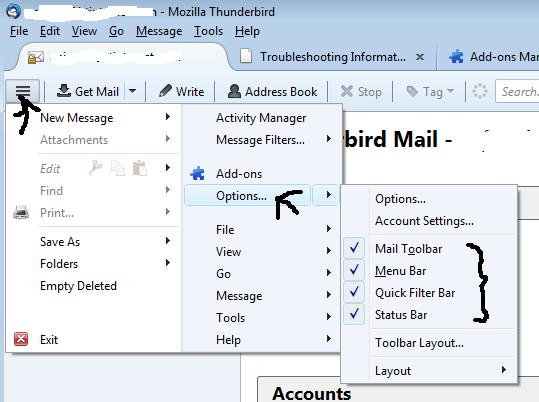
See image to make all toolbars visible
Ler esta resposta no contexto 👍 0Todas as respostas (4)
Hi, There is a new menu that is accessible by a click on the button with 3 horizontals lines (like Firefox).
The informations that you read seems outdated. Could you tell us where you find them?
If you want to see the old toolbars, press the alt key to make the menu bar appear. From the menu bar select View-Toolbars and turn them on.
You will have to do this in each window since they all have different toolbars.
You can also use the AppMenu button (square with 3 lines) like mentioned above but be prepared for most help documentation you find to not match the new menu layout. Some genius at Mozilla thought it would be a good idea to move all the menu choices around in the new AppMenu layout.
Solução escolhida
See image to make all toolbars visible
Thanks for the help, My problem is solved.