


Kurupira home page will not go away. tried browser reset.

it shows up on firefox and internet explorer. I suspect malicious code from the kurupira developers www.kurupira.net
Todas as respostas (4)
Go to address bar and type "about:config", press Enter, in the search bar, type "browser.startup.homepage" , on the option that will appears double click or click with right button mouse, then click on "Edit..", change its value to "about:home"
If the idea above doenst work try do the same process in safe mode
Try Firefox Safe Mode to see if the problem goes away. Safe Mode is a troubleshooting mode, which disables most add-ons.
(If you're not using it, switch to the Default theme.)
- On Windows you can open Firefox 4.0+ in Safe Mode by holding the Shift key when you open the Firefox desktop or Start menu shortcut.
- On Mac you can open Firefox 4.0+ in Safe Mode by holding the option key while starting Firefox.
- On Linux you can open Firefox 4.0+ in Safe Mode by quitting Firefox and then going to your Terminal and running: firefox -safe-mode (you may need to specify the Firefox installation path e.g. /usr/lib/firefox)
- Or open the Help menu and click on the Restart with Add-ons Disabled... menu item while Firefox is running.
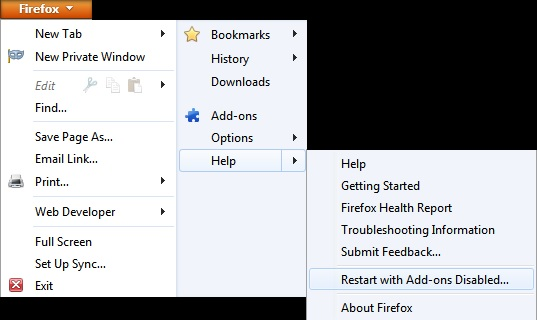
Once you get the pop-up, just select "'Start in Safe Mode"
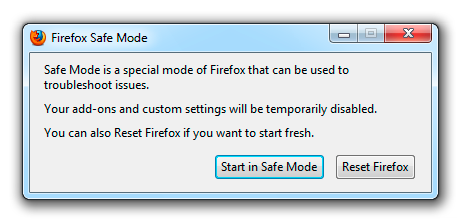
If the issue is not present in Firefox Safe Mode, your problem is probably caused by an extension, and you need to figure out which one. Please follow the Troubleshoot extensions, themes and hardware acceleration issues to solve common Firefox problems article for that.
To exit the Firefox Safe Mode, just close Firefox and wait a few seconds before opening Firefox for normal use again.
When you figure out what's causing your issues, please let us know. It might help other users who have the same problem.
Thank you.
Modificado por Diego Victor a
Hello squizzit, you can also try the SearchReset add-on, (the add-on resets your search preferences and home page to their default values, and then uninstalls itself)
you can also seek if you have in your profile folder a User.js file. The user.js file does not exist by default. If you have a user.js file and you create the file, don't delete it, if you have not create the file, then delete the User.js file, to see if the problem is there (it happens some programs to create the file).
thank you
You could also go to the control panel to see what was installed, as i suspect you downloaded something. I went there and tested a download when installing it wanted to close the browser, which suggests it is adding something on to browsers.
You can also look in your addons for Firefox :
https://support.mozilla.org/en-US/kb/find-and-install-add-ons-add-features-to-firefox
If all else fails there is malwarebytes, cant say it will remove, but worth a try
It's not a Kurupira malicious code. In the right corner of the start page you have this link: http://kurupira.net/startpage/kurupira_changingthehomepage.html