


display align

In this Web page (example): http://athena.unige.ch/athena/citations/cholokhov.html text-align-justify is note quite correct (see the second paragraph of English and French texts). Why?... It is correct with IE and other browsers.
Solução escolhida
Hello cor-el,
You are right!
It is a specific Firefox problem.
Thank you.
Roger
Ler esta resposta no contexto 👍 0Todas as respostas (4)
I'm not seeing any difference with Google Chrome. I'm on Linux, so can't check how IE displays it.
Can you attach a screenshot?
Use a compressed image type like PNG or JPG to save the screenshot and make sure that you do not exceed the maximum file size (1 MB).
Hello cor-el,
Thank you for answering.
I send you an attachment, as requested (.jpg, 323Kb).
The problem at: http://athena.unige.ch/athena/citations/cholokhov.html occurs only with Firefox, not with other browsers.
Regards.
Roger
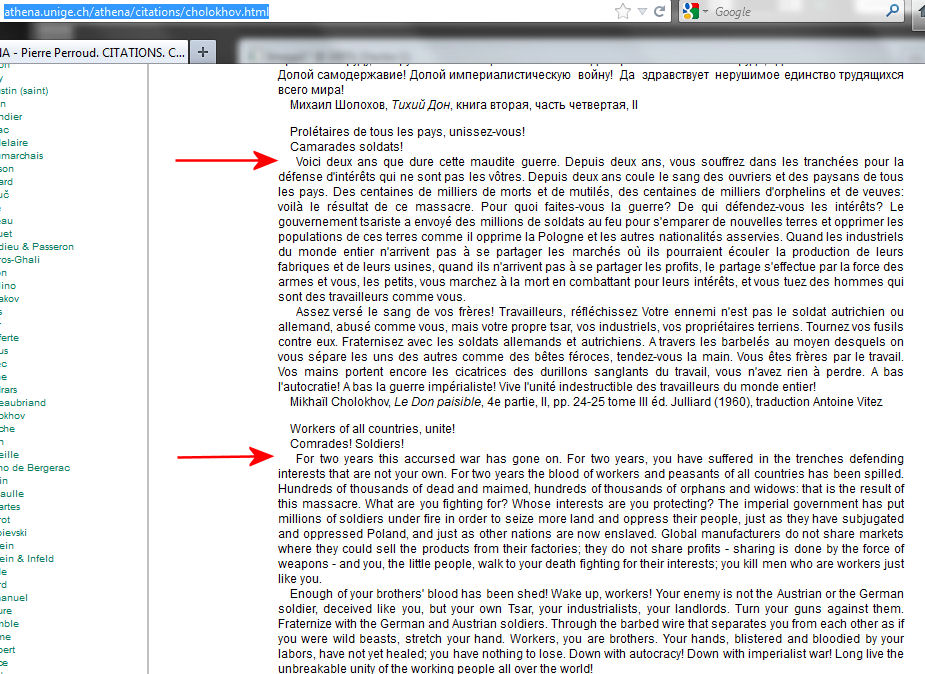
Seems to be related to the screen width.
If I drag the right border of the window left and right then that margin changes.
This also happens in Google Chrome.
Apparently I was lucky in my case and it shows the lines in the same position.
Solução escolhida
Hello cor-el,
You are right!
It is a specific Firefox problem.
Thank you.
Roger