


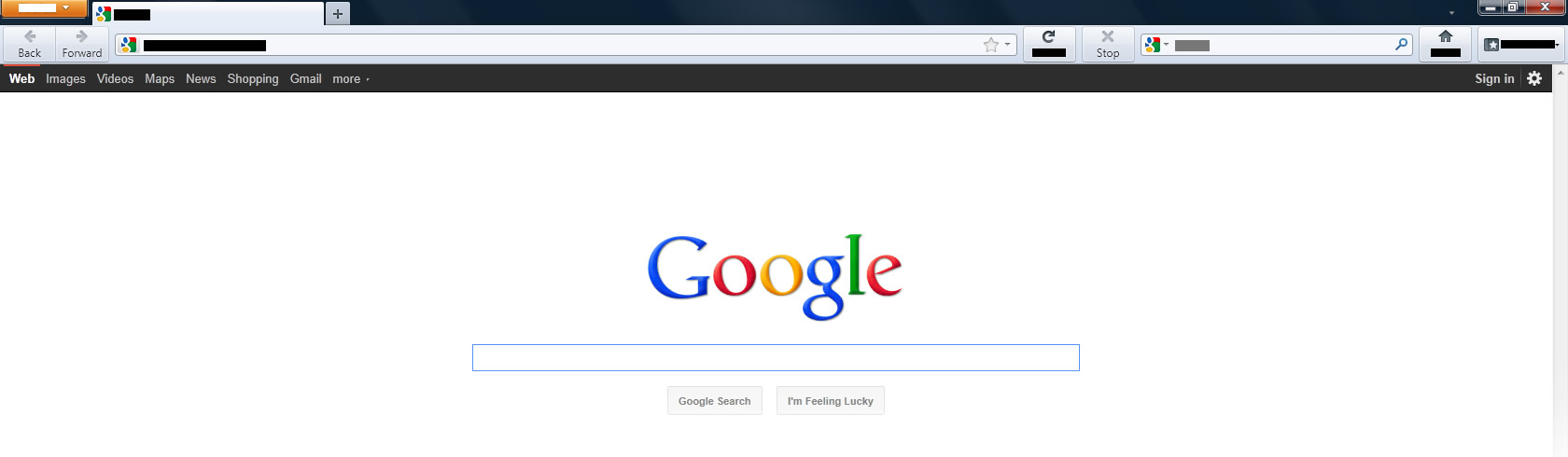
Graphical errors. The Address dropdown box is blacked out, and goes normal when highlighted, tabs are blacked out, buttons are half missing etc etc. This ONLY happens in firefox, reinstalled and turn all add-ons off and it persists.

Graphical errors. The Address dropdown box is blacked out, and goes normal when highlighted, tabs are blacked out, buttons are half missing etc etc. This ONLY happens in firefox, reinstalled and turn all add-ons off and it persists.
Todas as respostas (7)
I was fine until 2 nights ago I wanted to restart because my PC was acting weird. After I logged back on, my Firefox looked liek someone took a Sharpie marker to all the address, menus, add-on toolbars. Everything is blacked out.
the web page itself is fine.
i'm thinking virus but came up with a clean scan so far.
Try turning off Hardware Acceleration: Options > Advanced > General, un-check "Use hardware acceleration when available".
If this reply solves your problem, please click "Solved It" next to this reply when signed-in to the forum.
Didn't work. Wasn't even enabled to begin with. Here is a screen shot.
thedanbot:
I am not sure that your image matches Apoth's description as I interpret it.
Have you tried Firefox Safe Mode to see if an Add-on is causing your problem?
- Use Firefox Safe Mode to find a problem with an Extension or Plugin:
- Don't check anything when entering Safe Mode, just continue
- If the problem does not occur in Safe Mode it is probably and Extension or Plugin causing the problem
- See:
That worked for me.
thedanbot:
To help other users who might encounter the same problem as shown in your attached image, what Add-on(s) caused the problem?
What about:config in address bar -- setting gfx.direct2d.disabled to true and restarting browser might help. I have it disabled since it was introduced, it bugs the shit up in general.
Friend gave me that advice and it worked, thought i'd post it here