


Trying to setup an Outlook email address

I tried the automated setting up - several times but get the error message below, I tried changing the authentication but same result.
I tried the Help here: https://support.mozilla.org/en-US/kb/thunderbird-and-hotmail - but it didn't help!
I have the settings it shows for Outlook - but it doesn't work! When I "Continue" I get Authentication error. Show less
"Unable to log in at server. Probably wrong configuration, username or password.". It hasn't asked for a password.
I can login in to Outlook webmail and receive messages. Please help. I'm not overly technical but not totally ignorant either! Thanks, Isobel
Todas as respostas (7)
You could try specifying Graph when setting up your Outlook account. Exchange (the old system) is deprecated.
Graph?? Where - what is it? The Outlook email address is set up and functions via webmail but I can't get Thunderbird to add the account.
Please see the attached screenshot. Graph is the replacement for Exchange. This may apply to you. My university probably uses Graph, but won't allow us to use TB (yet).
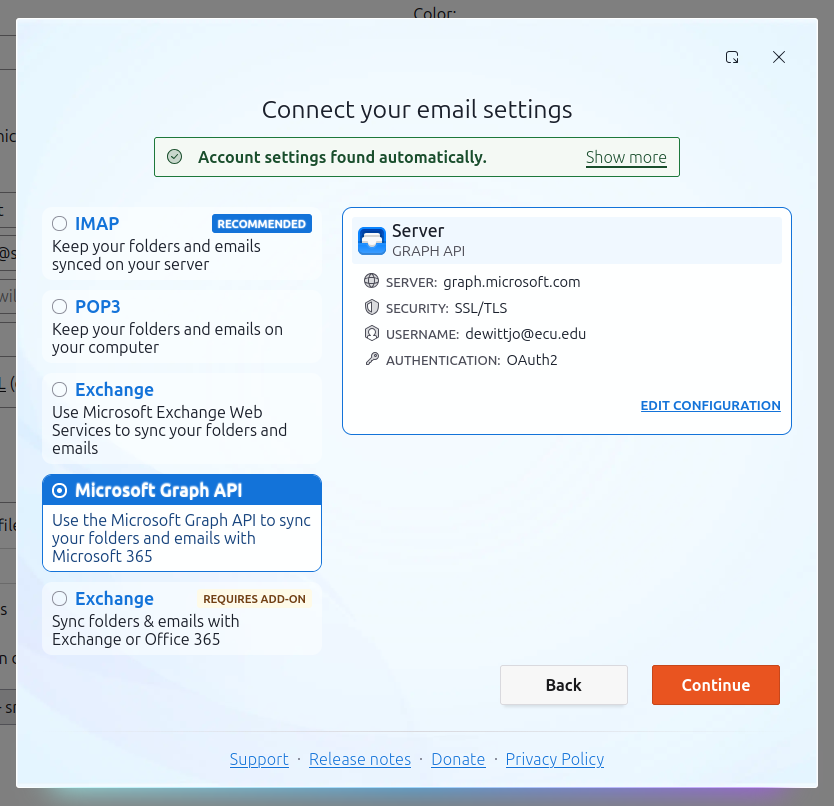
Thanks but I don't think this applies to me unfortunately.
Is your account just a consumer level free account. I think that is the point this discussion needs to start.
While free consumer level and the corporate hosted exchange all use the same infrastructure Microsoft never make things easy if their is a dollar in it. SO the precise type of exchange account involved is important information. I am guessing it is a consumer level free account because you referenced. https://support.mozilla.org/en-US/kb/thunderbird-and-hotmail
But there is a very important factor in setting up a new account in Thunderbird on Windows that is generally ignored (developers using Linux and MAC does not help.) and you say Windows 10.
Windows 10 is out of support so having a good antivirus is critical. They are also prone to completely blocking the setup of Thunderbird accounts. How lovely is that.
Norton has a habit of blocking the probing for settings as a denial of service attack. Others just want to scan the email using an unsupported encryption certificate and the connection fails, yet others think that is there is any outside connection they have to be privy to the plain text version, again using a self signed encryption certificate, so things fail.
- So is it really Windows 10? Home or professional?
- What antivirus do you use?
- What sort of account to you have with Microsoft Exchange? (Free hotmail/msn/live etc, office365, hosted as in corporate of a university or other major player provider Or even hosted on a domain provided by a hosting provider. All different unfortunately, only in subtle ways, but enough that you can not with certainty say anything.
I await you reply.
1. Yes, it is still Win 10. I'm sure I need a new computer before getting Win 11 and it is on the "To-Do" list! But a new computer always seems to bring a myriad of time consuming problems and I haven't had time to devote to them yet! 2. I'm just using Windows Defender, I was advised that's ok for my use. 3. Not actually sure! I don't have a hotmail account, I do have a gmail account but husband doesn't (new Outlook account is for husband - the one he has used for years has gone from provider to provider and we wish to abandon it) I'm a fairly ordinary user, am fairly computer literate as I my job was personnel software support but like many people I don't keep up with changes too much - the old version worked so we wish software didn't keep changing and getting more difficult to use!! Would it be simpler not to use Outlook but something else? It doesn't matter. Recommendations welcome.
A no-brainer is to switch to Thundermail. It's currently invite-only. Huge privacy benefits. Plays nice with Thunderbird.