


Windows 10 reached EOS (end of support) on October 14, 2025. If you are on Windows 10, see this article.

Pesquisar no apoio

Evite burlas no apoio. Nunca iremos solicitar que telefone ou envie uma mensagem de texto para um número de telefone ou que partilhe informações pessoais. Por favor, reporte atividades suspeitas utilizando a opção "Reportar abuso".

Saber mais
Resolvido

how do disable notification requests enterpise wide

peter huiskens

based on this article: https://support.mozilla.org/en-US/kb/push-notifications-firefox#w_manage-the-notifications-permission-for-all-websites

i can manually disable the notification requests in a single instance. However, how can i accomplish the same for my other 1000 users in one policy?

I tried different permission notification registry settings, but none seem to work. probably getting lost in the AI web that doesn't exactly know how to fix it.

I’m looking for something i can set in the registry,powershell or by gpo. It should work in all cases, new and existing firefox profiles.
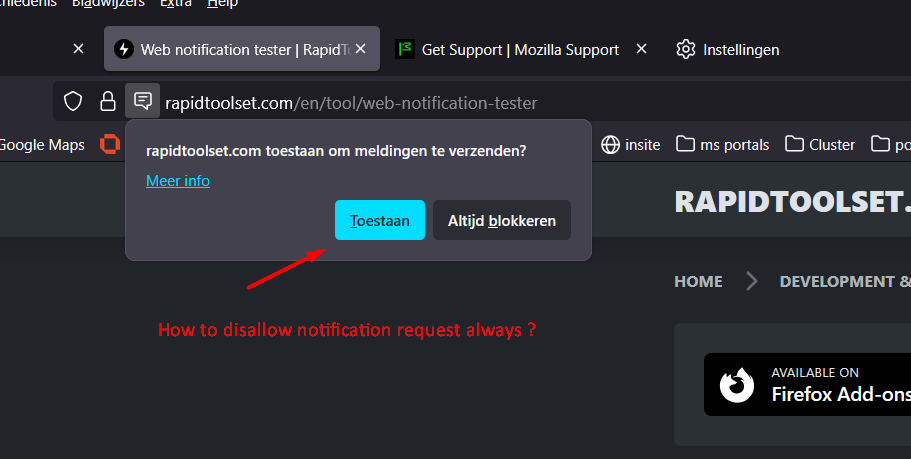
based on this article: https://support.mozilla.org/en-US/kb/push-notifications-firefox#w_manage-the-notifications-permission-for-all-websites i can manually disable the notification requests in a single instance. However, how can i accomplish the same for my other 1000 users in one policy? I tried different permission notification registry settings, but none seem to work. probably getting lost in the AI web that doesn't exactly know how to fix it. I’m looking for something i can set in the registry,powershell or by gpo. It should work in all cases, new and existing firefox profiles.
Capturas de ecrã anexadas

Todas as respostas (2)

Solução escolhida

You'd ideally ask in (or have mods move this to) support.mozilla.org/questions/firefox-enterprise however you're probably just looking for this:

permissions.default.desktop-notification

See firefox-admin-docs.mozilla.org/reference/policies/permissions/#values for Locked and BlockNewRequests bits.

Thnx @jbr , i'll try to implement this

Colocar questão

Deve iniciar a sessão com a sua conta para responder às mensagens. Por favor, comece uma nova pergunta, se ainda não tiver uma conta.