


Windows 10 reached EOS (end of support) on October 14, 2025. If you are on Windows 10, see this article.

Pesquisar no apoio

Evite burlas no apoio. Nunca iremos solicitar que telefone ou envie uma mensagem de texto para um número de telefone ou que partilhe informações pessoais. Por favor, reporte atividades suspeitas utilizando a opção "Reportar abuso".

Saber mais

Firefox 149.0 - after update can't save any file, instead it tries to Open everything - Linux Debian

  • 3 respostas
  • 0 têm este problema
  • Última resposta por jonzn4SUSE

1. This could be under-reported problem. People will have problems reporting this bug

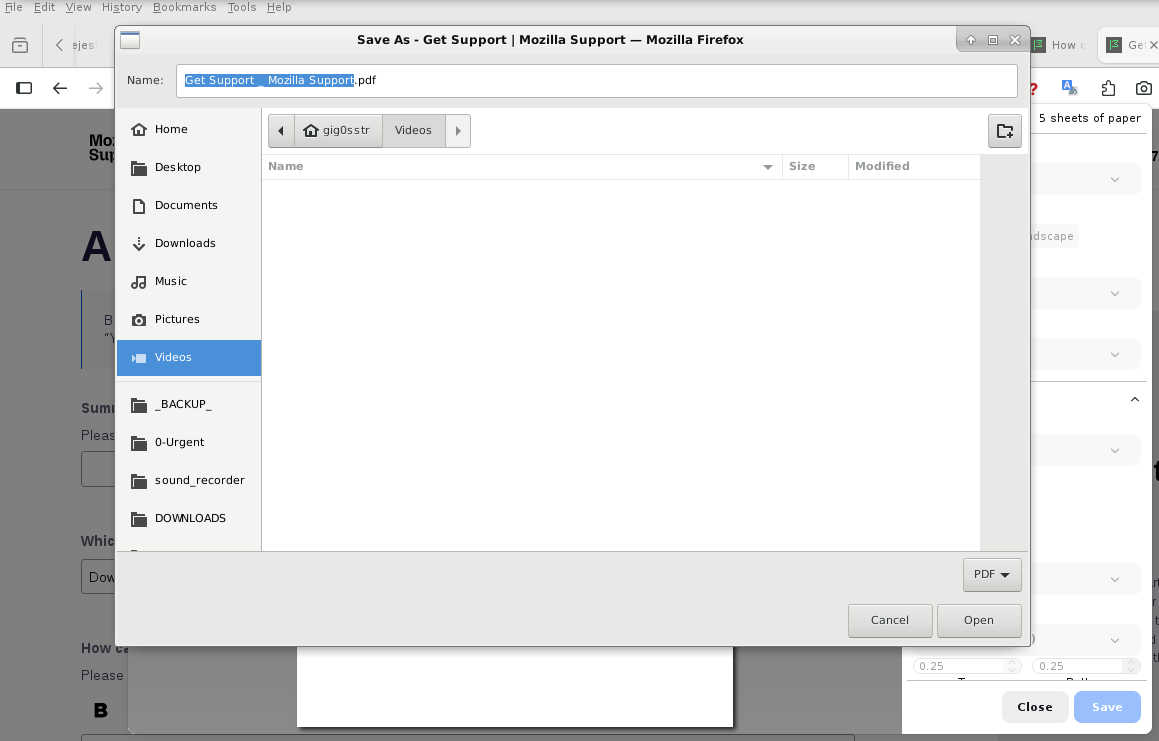
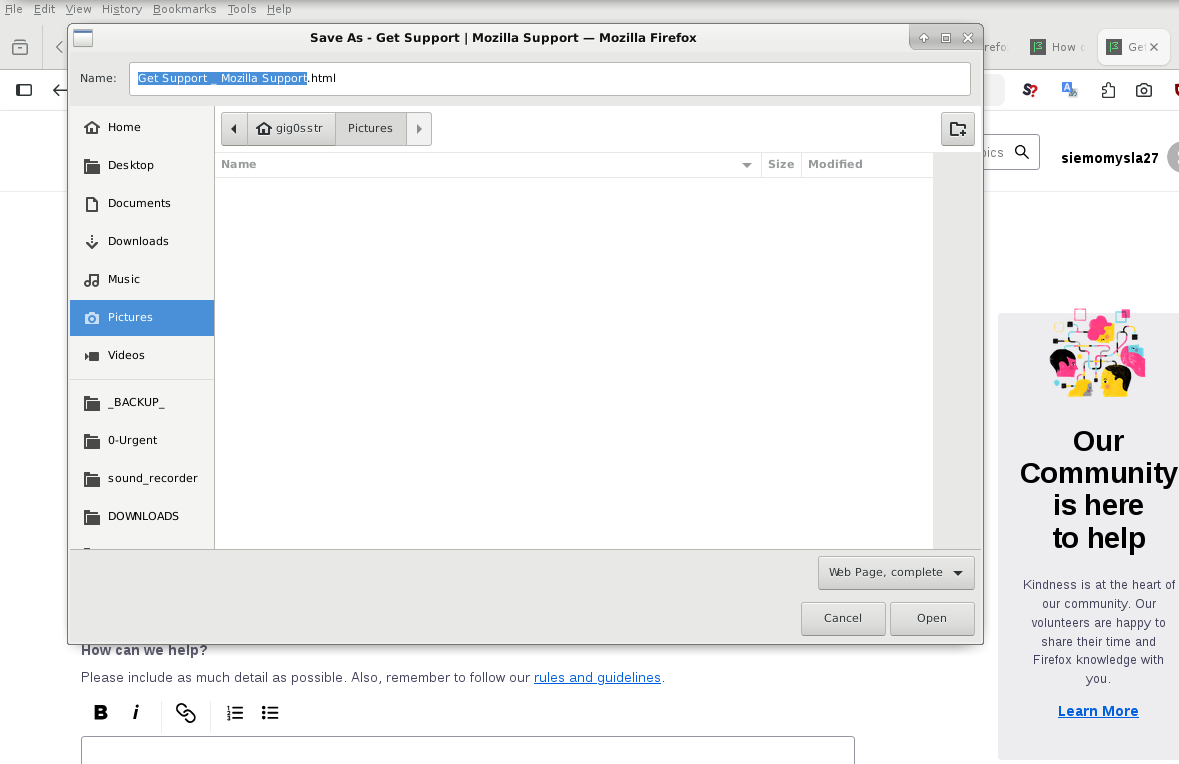
2. Whenever I try to save anything (image, website, Ctrl+S, print website to file, Ctrl+P, screenshots, same problem) my Firefox tries to "Open" something instead. I see dialog window with header SAVE, but the final button is labeled "Open" and after clicking it usually nothing happens. A haven't been able to save anything since this update. Only system-wide screenshots work for me now.

I had to use another installation in order to attach screenshot here. In the problematic 149.0, after clicking "Browse..." and selecting file, nothing happens, and no upload, moreover button won't respond to clicking anymore. Then I force refresh, and this text within this form disappears, but attached image appears.

3. Yesterday I have updated my Firefox to 149.0, using official debian sources, mozilla-deb - 1.0 -

cat /etc/apt/sources.list.d/mozilla.list deb [signed-by=/etc/apt/keyrings/packages.mozilla.org.asc] https://packages.mozilla.org/apt/ mozilla main

4. I have Linux Debian, (old version, Stretch+backports, yes, I am moving things already to new hdd), maybe it's related: 4.9.0-19-amd64 #1 SMP Debian 4.9.320-2 (2022-06-30) x86_64 GNU/Linux )

In order to fill this form I am using separate installation 140.9.0esr (64-bit), you could warn Debian teams not to propagate this error.

5. I have checked Console and Debugger, but they seem website-related. This error happens on every single website. Tried already troubleshooting mode, same problem. Please help us.
1. This could be under-reported problem. People will have problems reporting this bug 2. Whenever I try to save anything (image, website, Ctrl+S, print website to file, Ctrl+P, screenshots, same problem) my Firefox tries to "Open" something instead. I see dialog window with header SAVE, but the final button is labeled "Open" and after clicking it usually nothing happens. A haven't been able to save anything since this update. Only system-wide screenshots work for me now. I had to use another installation in order to attach screenshot here. In the problematic 149.0, after clicking "Browse..." and selecting file, nothing happens, and no upload, moreover button won't respond to clicking anymore. Then I force refresh, and this text within this form disappears, but attached image appears. 3. Yesterday I have updated my Firefox to 149.0, using official debian sources, mozilla-deb - 1.0 - cat /etc/apt/sources.list.d/mozilla.list deb [signed-by=/etc/apt/keyrings/packages.mozilla.org.asc] https://packages.mozilla.org/apt/ mozilla main 4. I have Linux Debian, (old version, Stretch+backports, yes, I am moving things already to new hdd), maybe it's related: 4.9.0-19-amd64 #1 SMP Debian 4.9.320-2 (2022-06-30) x86_64 GNU/Linux ) In order to fill this form I am using separate installation 140.9.0esr (64-bit), you could warn Debian teams not to propagate this error. 5. I have checked Console and Debugger, but they seem website-related. This error happens on every single website. Tried already troubleshooting mode, same problem. Please help us.
Capturas de ecrã anexadas

Todas as respostas (3)

My troubleshooting information https://pastebin.com/qjmi3067

Try downloading Firefox from Mozilla. Download, unzip, and run firefox-bin from the folder and see if you have the same issue. https://www.mozilla.org/en-US/firefox/all/#product-desktop-release

Colocar questão

Deve iniciar a sessão com a sua conta para responder às mensagens. Por favor, comece uma nova pergunta, se ainda não tiver uma conta.