


Windows 10 reached EOS (end of support) on October 14, 2025. For more information, see this article.

Pesquisar no apoio

Evite burlas no apoio. Nunca iremos solicitar que telefone ou envie uma mensagem de texto para um número de telefone ou que partilhe informações pessoais. Por favor, reporte atividades suspeitas utilizando a opção "Reportar abuso".

Saber mais

Issues Playing Audio From Firefox Notification

  • Nenhuma resposta
  • 0 têm este problema
more options

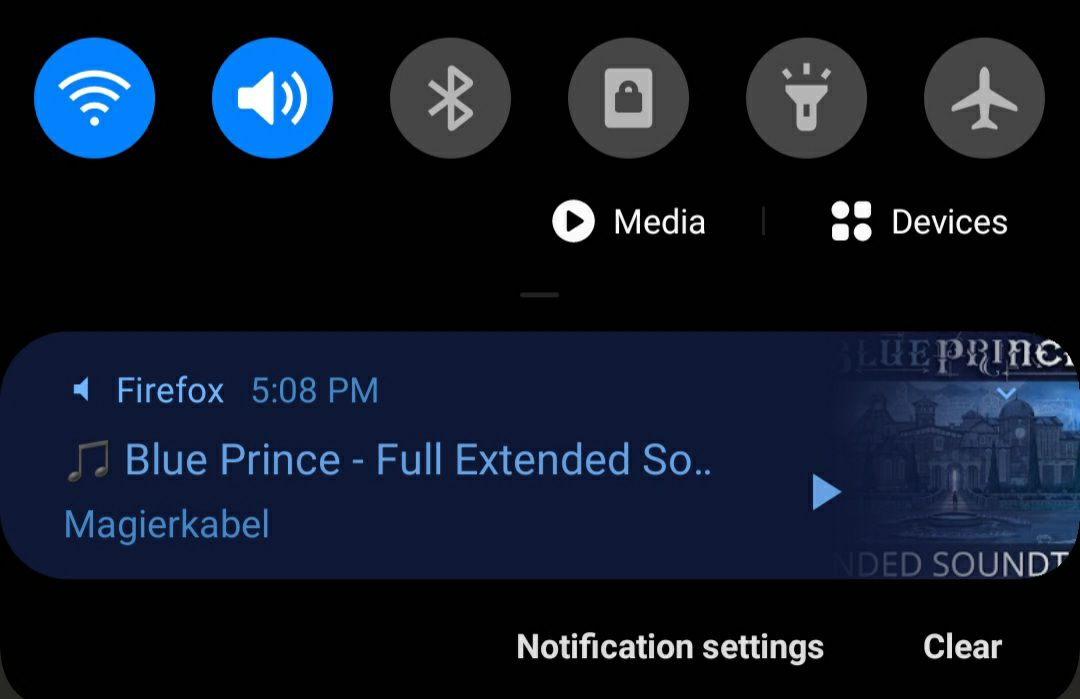
Hello! I've recently been having some issues getting videos to play in the background from Firefox's audio notification media player feature. I very frequently use YouTube in the Firefox browser so that I can then exit the browser and still play the audio of a video via the media player, but last night that media player stopped working for me. When I close the Firefox app, I still get the notification as usual, but tapping the "play" button achieves absolutely nothing. I've tried to search the issue and test some fixes myself, but nothing has worked so far. The fixes I've tried include:

  • Activated "Allow video and audio" in the Firefox Autoplay setting
  • Made sure autoplay was allowed in the YouTube browser tab
  • Tried to play the audio while connected to wi-fi and while on data
  • Checked for updates to my phone, YouTube, and Firefox (I am up to date)
  • Deployed the old "turn it off and turn it back on again" fix, both in Firefox (closing all tabs and re-opening), and for my phone (shut it down and restarted it).

None of the settings for the media player or general notifications for Firefox seem to govern this issue, so I'm bringing it here. Thank you for taking the time to read through all of this. Please let me know if you have any suggestions for me! (I've included a photo of the notification bar for extra reference)
Hello! I've recently been having some issues getting videos to play in the background from Firefox's audio notification media player feature. I very frequently use YouTube in the Firefox browser so that I can then exit the browser and still play the audio of a video via the media player, but last night that media player stopped working for me. When I close the Firefox app, I still get the notification as usual, but tapping the "play" button achieves absolutely nothing. I've tried to search the issue and test some fixes myself, but nothing has worked so far. The fixes I've tried include: * Activated "Allow video and audio" in the Firefox Autoplay setting * Made sure autoplay was allowed in the YouTube browser tab * Tried to play the audio while connected to wi-fi and while on data * Checked for updates to my phone, YouTube, and Firefox (I am up to date) * Deployed the old "turn it off and turn it back on again" fix, both in Firefox (closing all tabs and re-opening), and for my phone (shut it down and restarted it). None of the settings for the media player or general notifications for Firefox seem to govern this issue, so I'm bringing it here. Thank you for taking the time to read through all of this. Please let me know if you have any suggestions for me! (I've included a photo of the notification bar for extra reference)
Capturas de ecrã anexadas

Deve iniciar a sessão com a sua conta para responder às mensagens. Por favor, comece uma nova pergunta, se ainda não tiver uma conta.