


Windows 10 reached EOS (end of support) on October 14, 2025. If you are on Windows 10, see this article.

Pesquisar no apoio

Evite burlas no apoio. Nunca iremos solicitar que telefone ou envie uma mensagem de texto para um número de telefone ou que partilhe informações pessoais. Por favor, reporte atividades suspeitas utilizando a opção "Reportar abuso".

Saber mais
Open

Bookmarks are not saving properly

sobitthen replied
sobitthen

I find a website I like, I add to bookmarks, chose a location, add some tags and save.

Next I look for bookmark to verify it saved and it is not in folder it was saved into.

I open Bookmarks and search for this newly created bookmark and it is not in the correct location, it is in another folder, or past the folder in a tree that is not seen under the drop-down up under address bar, only through searching via Bookmarks. After I searched and I had found it, I chose open in folder, saw its position and dragged it to the folder and position I wanted it to be, then close the search, use the drop down folders in bookmark bar and not there. ??

Go back to Bookmark search, find it and it is shown to be where I last dragged it, but it is not there unless I search for it.

So not sure what is going on with bookmarks, but after saving they are not saved where I directed them to save and I am losing my bookmarks to some void in my bookmark manager.
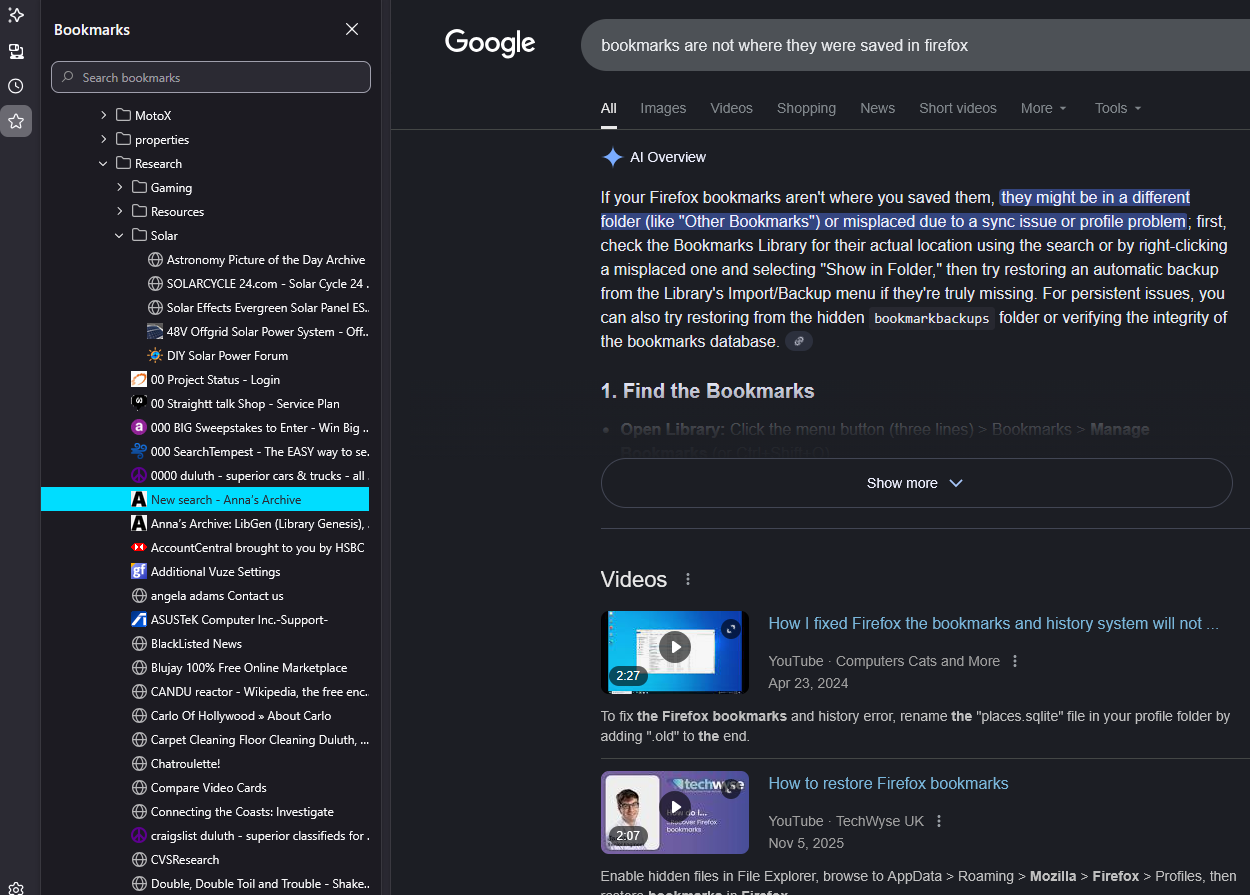
I find a website I like, I add to bookmarks, chose a location, add some tags and save. Next I look for bookmark to verify it saved and it is not in folder it was saved into. I open '''Bookmarks''' and search for this newly created bookmark and it is not in the correct location, it is in another folder, or past the folder in a tree that is not seen under the drop-down up under address bar, only through searching via Bookmarks. After I searched and I had found it, I chose open in folder, saw its position and dragged it to the folder and position I wanted it to be, then close the search, use the drop down folders in bookmark bar and not there. ?? Go back to Bookmark search, find it and it is shown to be where I last dragged it, but it is not there unless I search for it. So not sure what is going on with bookmarks, but after saving they are not saved where I directed them to save and I am losing my bookmarks to some void in my bookmark manager.
Capturas de ecrã anexadas

Todas as respostas (1)

Inside the solar folder when I drop down off bookmark bar there is only 5 entries, in this image I uploaded, it makes them all look to be inside this solar folder, they are not, they were saved to the Research folder.

Colocar questão

Deve iniciar a sessão com a sua conta para responder às mensagens. Por favor, comece uma nova pergunta, se ainda não tiver uma conta.