


bookmark icons showing up as wireframe globes

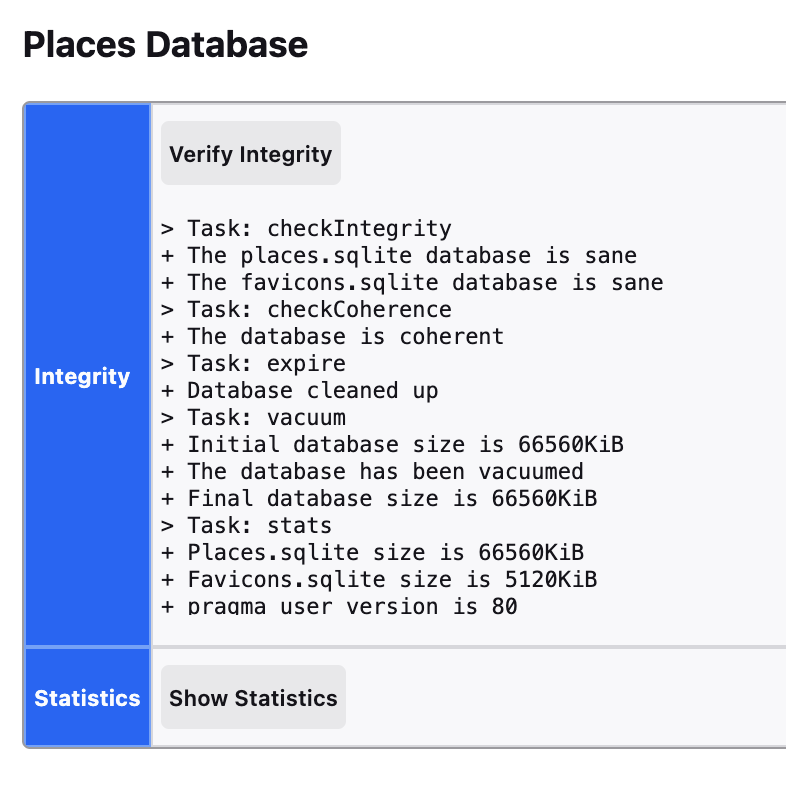
I've tried the "verify integrity" fix and got the results shown in the screenshot below. I've restarted my mac, I've shutdown and started my mac with a hard boot and the icons still show up like globes.
Solução escolhida
There are several possible reasons for icons not to save, including URLs that changed and now redirect to a new address. In this case, the star icon won't be blue any more, so you'll be able to spot those pretty easily. The other problems are less obvious, such as the site instructing Firefox not to cache images, or serving an updated format or size that works well on the tab but isn't backwards compatible with the format used for bookmarks. That side of Firefox could use an update.
Ler esta resposta no contexto 👍 0Todas as respostas (3)
Looking at the size reported for favicons.sqlite (only about 5MB), it sounds like there isn't much in there. As you visit bookmarked sites, is Firefox able to save and show the site icons?
As I visit my bookmarked sites, some of the site icons appear as the page loads. But, in other cases, they never appear. However, if I drag the tab down to the bookmark toolbar and place it next to the non working icon I am able to edit the name of the bookmark and then delete the old one. Lastly, this does not work for all of the sites. I struggle to figure a simple method to restore them under my "Manage Bookmarks" tab . . . uggh
Solução escolhida
There are several possible reasons for icons not to save, including URLs that changed and now redirect to a new address. In this case, the star icon won't be blue any more, so you'll be able to spot those pretty easily. The other problems are less obvious, such as the site instructing Firefox not to cache images, or serving an updated format or size that works well on the tab but isn't backwards compatible with the format used for bookmarks. That side of Firefox could use an update.