


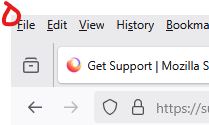
unable to click "file" menu on extreme top left corner

Hi, after the recent update i am not able to click on the File menu on extreme top left corner, i think it is due to the rounded corners of the selection box, the corner pixels are inactive when hovering over. This makes clicking harder, before i could click it blindly by moving the mouse to the top teft corner fast, now i have to aim it, please fix this.
Hi, after the recent update i am not able to click on the File menu on extreme top left corner, i think it is due to the rounded corners of the selection box, the corner pixels are inactive when hovering over. This makes clicking harder, before i could click it blindly by moving the mouse to the top teft corner fast, now i have to aim it, please fix this.
Solução escolhida
Solved in update 139.0.1, thanks
Ler esta resposta no contexto 👍 0Todas as respostas (1)
Solução escolhida
Solved in update 139.0.1, thanks