


firefox update

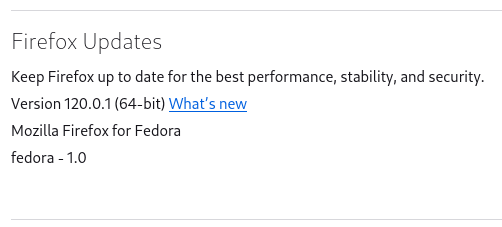
I was informed that I need to update Firefox. (Currently running Version 120.0.1 (64-bit) Linux (Fedora). I downloaded firefox-136.0.tar.xz but it is not auto installing. I checked the Settings -> General -> Firefox Updates section, but it is grayed out. I do not have the ability to Check for Updates, or change the auto update options.
How do I install the update?
Todas as respostas (1)
The screenshot is of a package build of Firefox provided by Fedora. The updates are in the package manager that is if your version of Fedora is still supported with package updates as Mozilla does not provide internal Firefox updates to third-party builds.
The tarball version of Firefox from Mozilla should not be attempted to be installed over the fedora package build of Firefox as mixing will potentially cause problems to say the least.
The tarball is basically an archive with no installer or package or such as you just extract and should have a firefox folder. You can then run the firefox script or firefox-bin to start Firefox is the basics. To make sure Firefox gets internal updates from Mozilla on next release make sure this firefox folder has read/write permissions for the user. If you are the only user then a popular place to put the firefox folder is in /Home/
If you need a Firefox icon then there are some in the firefox/browser/chrome/icons/default/ folder. The mention of chrome here has nothing to do with the separate Google Chrome.