


Security certificate exception

Typically if I experience a security certificate exception, thunderbird will popup the certificate exception box, I click to get certificate and am done.
Today I cannot get the certificate popup to appear. which is fine I know where the certificates are managed but I have not a clue how to add a certificate OR what information to enter into the "Add security exception" dialogue box
Any help would be greatly appreciated.
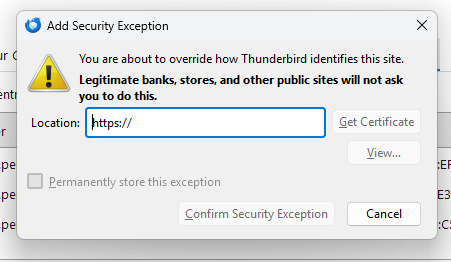
Solução escolhida
If you're getting that, it's almost certainly because you've configured the account to use a wrong mail server in Thunderbird. You shouldn't be getting that and you shouldn't have to add any security exceptions…
Ler esta resposta no contexto 👍 0Todas as respostas (7)

Solução escolhida
If you're getting that, it's almost certainly because you've configured the account to use a wrong mail server in Thunderbird. You shouldn't be getting that and you shouldn't have to add any security exceptions…
When I downloaded Thunderbird all I did was enter in the email address and TB did all the settings automatically. I just had to enter in password. I have used TB for about 3 years now, and periodically this security exception appears. It is quite easy to renew the certificate IF that popup window will appear. Now I am just getting a notice in the lower right hand corner where TB displays new incoming messages.
I can certainly give a try to change the email settings.
Good Day,
I manually edited the email settings in Thunderbird changing to what my domain host had in the email configuration page. Email is working. I have NO Idea why in the world I have never thought about editing the email server settings. Oh my heavens.
Thank you for your assistance.

Hello @DavidGG, I too am having this issue. As above, "when I downloaded Thunderbird all I did was enter in the email address and TB did all the settings automatically. I just had to enter in a password." I don't have access to the mail server and I cannot see anything wrong with the settings automatically entered by TB. Any ideas? Thanks
PS I've found the certificate for the mail server in the Certificate Manager under Let's Encrypt. The Certificate name = xxxx.net.au and the server = xxxx.org.au. Could this be the issue?
Modificado por ae a
Hello @DavidGG, I too an having this issue. As above, "when I downloaded Thunderbird all I did was enter in the email address and TB did all the settings automatically. I just had to enter in a password." I cannot see anything wrong with the settings automatically entered by TB. I found the certificate in the Certificate Manager under Let's Encrypt. Could it be that the Certificate name= xxxx.net.au and the server = xxxx.org.au? If so, I assume the server owner will need to fix this, correct? Thanks
Hello @DavidGG, I too an having this issue. As above, "when I downloaded Thunderbird all I did was enter in the email address and TB did all the settings automatically. I just had to enter in a password." I cannot see anything wrong with the settings automatically entered by TB. I found the certificate in the Certificate Manager under Let's Encrypt. Could it be that the Certificate name= xxxx.net.au and the server = xxxx.org.au? If so, I assume the server owner will need to fix this, correct? Thanks

Good Day,
To resolve the issue, I manually edited the email settings in Thunderbird changing to what my domain host had in their email configuration help page. Email is working. That resolved the problem. Never had it again.