Windows 10 reached EOS (end of support) on October 14, 2025. If you are on Windows 10, see this article.

Pesquisar no apoio

Evite burlas no apoio. Nunca iremos solicitar que telefone ou envie uma mensagem de texto para um número de telefone ou que partilhe informações pessoais. Por favor, reporte atividades suspeitas utilizando a opção "Reportar abuso".

Saber mais

Junk mail not working as expected

  • 2 respostas
  • 0 têm este problema
  • 209 visualizações
  • Última resposta por howard19
  • Arquivadas

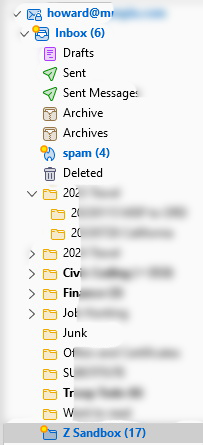
I have an IMAP setup with Inbox, Spam plus various other folders, one of which is Sandbox. I used email filtering to move emails from unknown senders to the Sandbox after Junk filtering. I have also added the Junk button to the mail tool bar.

When I look in my Spam folder, I will see multiple emails. Some of which have been marked Spam and others have not be so marked. When I select multiple emails and press the Junk button on the menu bar, if just one of the selected emails is already marked junk, the emails will be moved to either my Inbox or Sandbox rather than being deleted, which is what I expected.

I have an IMAP setup with Inbox, Spam plus various other folders, one of which is Sandbox. I used email filtering to move emails from unknown senders to the Sandbox after Junk filtering. I have also added the Junk button to the mail tool bar. When I look in my Spam folder, I will see multiple emails. Some of which have been marked Spam and others have not be so marked. When I select multiple emails and press the Junk button on the menu bar, if just one of the selected emails is already marked junk, the emails will be moved to either my Inbox or Sandbox rather than being deleted, which is what I expected.

Todas as respostas (2)

Who is your mail provider? Which Sandbox ?

The mail server is from my website which is hosted by Hostgator.

Z Sandbox is just the name of a folder where I send mail from unknown recipients.