


empower-retirement.com

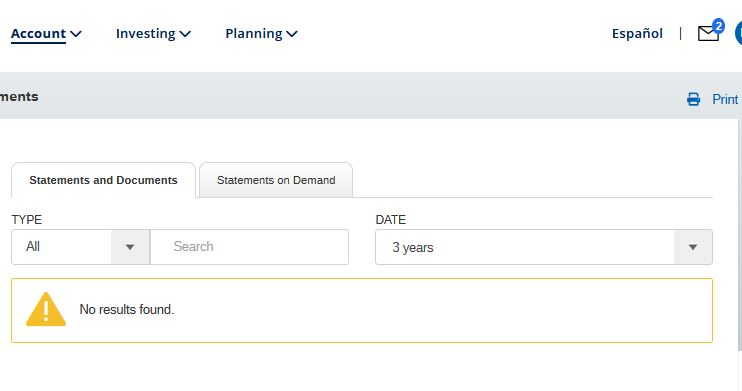
For empower-retirement.com, i can log into the account and in the account, statement and documents part of the page. under statements, it lists a yellow triangle with an white exclamation point and "No Results Found". If i use chrome, i see my monthly statements. This used to work a few months ago. i just upgraded today to 110.0.1 and hoped it would work but doesn't. Any ideas? I like firefox and want to continue to use it. Thanks.
Todas as respostas (4)
You can try these steps in case of issues with webpages:
You can reload webpage(s) and bypass the cache to refresh possibly outdated or corrupted files.
- hold down the Shift key and left-click the Reload button
- press "Ctrl + F5" or press "Ctrl + Shift + R" (Windows,Linux)
- press "Command + Shift + R" (Mac)
Clear the Cache and remove the Cookies for websites that cause problems via the "3-bar" Firefox menu button (Settings).
"Remove the Cookies" for websites that cause problems:
- Settings -> Privacy & Security
Cookies and Site Data: "Manage Data"
"Clear the Cache":
- Settings -> Privacy & Security
Cookies and Site Data -> Clear Data -> [X] Cached Web Content -> Clear
- https://support.mozilla.org/en-US/kb/clear-cookies-and-site-data-firefox
- https://support.mozilla.org/en-US/kb/how-clear-firefox-cache
Start Firefox in Troubleshoot Mode to check if one of the extensions ("3-bar" menu button or Tools -> Add-ons -> Extensions) or if hardware acceleration or if userChrome.css/userContent.css is causing the problem.
- switch to the DEFAULT theme: "3-bar" menu button or Tools -> Add-ons -> Themes
- do NOT click the "Refresh Firefox" button on the Troubleshoot Mode start window
I have no extensions nor themes being used. I just use the straight browser. i cleared cookies and cache prior to writing the post. In good faith, i did those steps again. still no joy.
You can check for issues with Total Cookie Protection.
- https://support.mozilla.org/en-US/kb/total-cookie-protection-and-website-breakage-faq
- https://support.mozilla.org/en-US/kb/introducing-total-cookie-protection-standard-mode
You can check the Web Console (Tools -> Web Developer) for messages about blocked content and about the presence of mixed or unsafe content.
You can check the Network Monitor to see if content is blocked or otherwise fails to load.
If necessary use "Ctrl+F5" or "Ctrl+Shift+R" (Mac: Command+Shift+R) to reload the page and bypass the cache to generate a fresh log.
You can remove all data stored in Firefox for a specific domain via "Forget About This Site" in the right-click context menu of an history entry ("History -> Show All History" or "View -> Sidebar -> History").
Using "Forget About This Site" will remove all data stored in Firefox for this domain like history and cookies and passwords and exceptions and cache, so be cautious. If you have a password or other data for that domain that you do not want to lose, make sure to backup this data or make a note.
You can't recover from this 'forget' unless you have a backup of involved files.
If you revisit a 'forgotten' website, data for that website will be saved once again.
this is getting beyond my skill set. I did select "forget about this site" but i still can't see my statements.
Attached is the look from Web Console (Tools -> Web Developer) for messages about blocked content

