


Thunderbird E-mail 78.12.0 (32 bit)

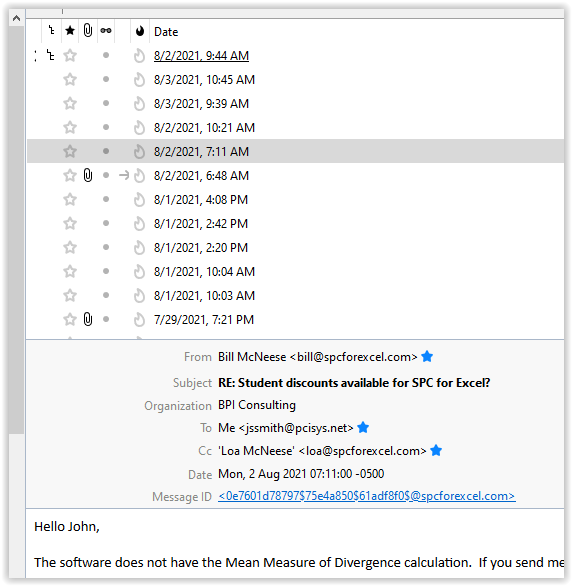
After using Thunderbird exclusively for several years and being very satisfied, about two weeks ago the top box which shows information on sender, date, and other content now only shows the date and time without sender information. To view that information I need to check on the date and then the information appears in the bottom section of the program. There are seven vertical columns next to the date/time information. These, in order, are a blank box with the symbol like | but with a space in the middle, a box with a stair step looking character, a box with a star, a box with a paperclip (for attachments), a box with a double zero together )looks like a pair of eyeglasses, a blank box with an arrow pointing to right in a couple of emails, a box with a flame, and finally the Date box (image of screen shot attached).
Do you have suggestions how to return the program to showing the full information on the received line in the top box?
Thanks !!!
Todas as respostas (1)
Right-click the Date column button, or any other column button, Restore Column Order. If that doesn't help, open a folder that has the correct columns, then right-click a column button, Apply Columns To... choose the original folder.