


Join us to show up for other Firefox users 🦊. Earn fun badges and Mozilla swag vouchers! Find out more: https://mzl.la/askafox150

Windows 10 reached EOS (end of support) on October 14, 2025. If you are on Windows 10, see this article.

Pesquisar no apoio

Evite burlas no apoio. Nunca iremos solicitar que telefone ou envie uma mensagem de texto para um número de telefone ou que partilhe informações pessoais. Por favor, reporte atividades suspeitas utilizando a opção "Reportar abuso".

Saber mais

Screenshot copied to clipboard.

  • 1 resposta
  • 1 tem este problema
  • 237 visualizações
  • Última resposta por N.Aumond
  • Arquivadas

Hi,

The "Take a Screenshot" function is excellent.

When I take a screenshot and click "Copy" to copy it to the clipboard, a pop-up above the taskbar is shown: "Shot Copied Your shot has been copied to the clipboard. Press CTRL-V to paste."

It is displayed for approx. 10 seconds unless the X in the top-right corner of the pop-up is clicked. Is there a way to perform this function but suppress the pop-up (e.g. in about:config)?

Thank you.
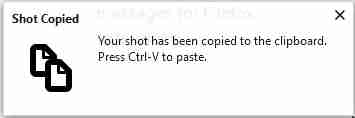
Hi, The "Take a Screenshot" function is excellent. When I take a screenshot and click "Copy" to copy it to the clipboard, a pop-up above the taskbar is shown: "Shot Copied Your shot has been copied to the clipboard. Press CTRL-V to paste." It is displayed for approx. 10 seconds unless the X in the top-right corner of the pop-up is clicked. Is there a way to perform this function but suppress the pop-up (e.g. in about:config)? Thank you.
Capturas de ecrã anexadas

Todas as respostas (1)

I have the same issue, I know I can temporarily turn off the notifications by going to the Tools / Options / Privacy & Security / Notifications / and check the "Pause notifications until Firefox restarts" box.

But that works until Firefox restarts, so I must repeat the turning off notification every time...

Why in hell does that splash notification has no option to be turned off forever!

It's been since 2018 this issue has been reported?