


Firefox blank page and crash

All of a sudden, Firefox appears frozen on launch: doesn't launch any web page, or any page, in face--preference, or any of the about: pages. Just blank page. Clicks are registered, but don't have any effect.
If I close the window, multiple firefox processes linger for a while, and then the crash window pops up.
So far, I've: deleted the ~/.mozilla directory; downloaded fresh version of both 86 and 87 developer editions; restarted with addons disabled; and various combinations thereof.
I'm on Linux Mint 64-bit, latest version.
Firefox is completely unusable for me now. And I think it started with my rebooting my PC (which I've done multiple times so far).
This looks suspiciously similar to https://www.reddit.com/r/firefox/comments/a5qru6/firefox_64_opens_blank_tab_and_crashes/ and https://bugzilla.mozilla.org/show_bug.cgi?id=1513855. They don't seem to have any solutions, though.
Any thoughts?
Todas as respostas (9)

In the address bar, type about:crashes<enter>. Note: If any reports do not have BP- in front of the numbers/letters, click it to submit them.
The crash report is several pages of data. We need the report numbers to see the whole report.
Using your mouse, mark the most recent 7 - 10 Submitted crash reports, and copy them. Now go to the reply box and paste them in.
Please, Do not post a screenshot ! !
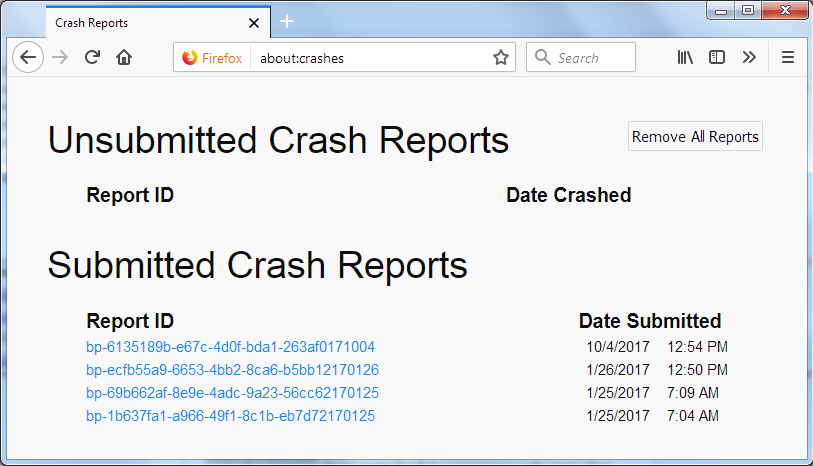
For more help on crash reports, see; https://support.mozilla.org/en-US/kb/firefox-crashes-asking-support
Thanks, but as mentioned above, no page loads, including about:crashes.
I have attached in the bug report I filed the details shown to me from the crash reporter window: https://bugzilla.mozilla.org/show_bug.cgi?id=1696629.
If you can't get Firefox to open, you will have to do this the hard way. https://support.mozilla.org/en-US/kb/mozillacrashreporter
Open the file browser / explorer on your computer. Note: You may have to enable Show Hidden Folders / Files. Enter this in the address bar;
Windows: %APPDATA%\Mozilla\Firefox\Crash Reports\submitted Win 7/Vista: C:\Users\<username>\AppData\Roaming\Mozilla\Firefox\Crash Reports\submitted Win XP/2000: C:\Documents and Settings\<username>\Application Data\Mozilla\Firefox\Crash Reports\submitted Win 10: Press <Windows> + R on the keyboard. A Run dialog will open. In the Run dialog, type %APPDATA%\Mozilla\Firefox\Crash Reports\submitted <Enter>
Mac OS: /Users/<username>/Library/Application Support/Firefox/Crash Reports/submitted
Linux: /home/<username>/.mozilla/firefox/Crash Reports/submitted
Copy the most Recent 5-7 File Names in the folder. Press the Reply button. Now go to the reply box and paste them in.
Does Linux have any kind of Safe Mode startup where you can bypass background tasks that normally launch as a test of whether they are causing problems for Firefox?
OK, I've 3 files in the submitted directory:
bp-23f92eee-2e4f-4d35-9815-8682b0210305.txt bp-bdb02706-648c-4fd0-b9c3-dcc400210305.txt bp-ef61dfa3-6e9d-4ece-817f-01dc20210305.txt
I've a couple of more in the pending directory, but I suspect these are of any use:
696faf60-c2dc-e415-9bf7-c6007b494a69.dmp 07c6d0a8-a2c8-4a8d-d492-0a4dbe7fa061.dmp
Those reports are a shutdown hang where Fireofox takes too long to close and a crash is enforced.
signature: Firefox 87.0b6 Crash Report [@ AsyncShutdownTimeout | profile-change-teardown | Extension shutdown: formautofill@mozilla.org,Extension shutdown: screenshots@mozilla.org,Extension shutdown: webcompat-reporter@mozilla.org,Extension shutdown: webcompat@mozilla.org ]
You can create a new profile as a quick test to see if your current profile is causing the problem.
See "Creating a profile":
If the new profile works then you can transfer files from a previously used profile to the new profile, but be cautious not to copy corrupted files to avoid carrying over problems.
As mentioned in my first post, deleting ~/.mozilla directory was what I tried the first time. To convince myself again, I launched Firefox with -P, and deleted all residue profiles. The issue remains.
Note that Firefox only crashes after I close it. It stays up as a vegetable if I leave it running. I suspect, whatever is causing it to crash when closing, is also the behind it being unresponsive while running.
Boot the computer in Windows Safe Mode with network support to see if that has effect.