


Scrolling Screenshot on IOS
Is there a scrolling screenshot option on FireFox IOS? It is not in the pages option menu as it is on macOS, I can see many questions on this but all answers are to look in the pages options......
Todas as respostas (4)

Select the three dots at the end of the search bar and then choose Take a Screenshot. You can scroll beyond what is visible to highlight multiple screens. When done, select Download at the bottom of the select window.
Arghh that is the answer i see everywhere but there is no ‘take a screenshot’ option? Can you please post an image of this from IOS? It is on MacOS but neither my iPhones nor iPads have the option....
This is what i see
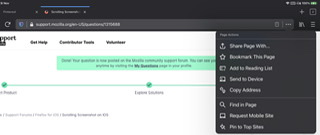
While this function is available on iOS, I don’t see any way to capture a screenshot of an entire page in Firefox (only the viewable portion of that page).