


Ordered List (<ol> tag) - broken numbering
Hi everyone,
I have a strange issue with ordered list and sub ordered list, the numbering is inconsistant.
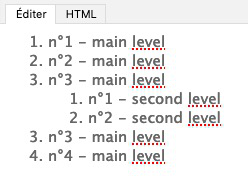
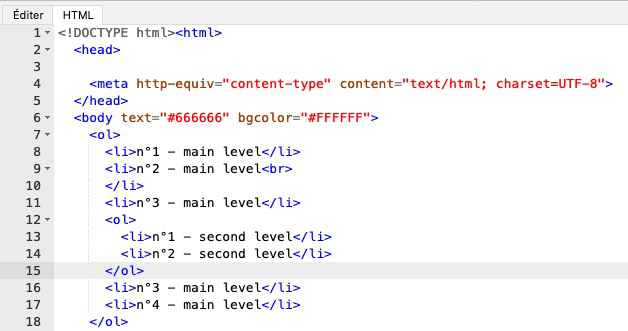
See pics for version "text" and "html" version.
The sub- is part of the main
- .
Thunderbird do :
-
<li>n°1 - main level
<li>n°2 - main level
<li>n°3 - main level
-
<li>n°1 - second level
<li>n°2 - second level
- should be :
-
<li>n°1 - main level
<li>n°2 - main level
<li>n°3 - main level
-
<li>n°1 - second level
<li>n°2 - second level
I had to instal a plugin to edit the HTML
Thanks !
- but not included in the
Hi everyone,
I have a strange issue with ordered list and sub ordered list, the numbering is inconsistant.
See pics for version "text" and "html" version.
The sub <ol> is part of the main <ol> but not included in the <li>.
Thunderbird do :
<ol>
<li>n°1 - main level</li>
<li>n°2 - main level<br>
</li>
<li>n°3 - main level'''</li>'''
<ol>
<li>n°1 - second level</li>
<li>n°2 - second level</li>
</ol>
<li>n°3 - main level (should be n°4)</li>
<li>n°4 - main level (should be n°5)</li>
</ol>
The correct <ol> should be :
<ol>
<li>n°1 - main level</li>
<li>n°2 - main level<br>
</li>
<li>n°3 - main level
<ol>
<li>n°1 - second level</li>
<li>n°2 - second level</li>
</ol>
'''</li>'''
<li>n°4 - main level</li>
<li>n°5 - main level</li>
</ol>
I had to instal a plugin to edit the HTML
Thanks !
Todas as respostas (3)
That's because internal OL should be inside LI, not outside.
I know, but it like Thunderbird create it. Not really cool... It sound like a bug.
I have to edit the OL myself with a plugin (I'm webdeveloper), when I put the LI closer at the right place, it's ok.
But it should be automatic.
I didn't find a place to report bugs, do you know where I could drop this ?
Try here => https://bugzilla.mozilla.org/enter_bug.cgi
Modificado por TyDraniu a