


Used to be when I signed out of Sync, my data and add-ons get removed, now if I signed out all the data including my passwords stay
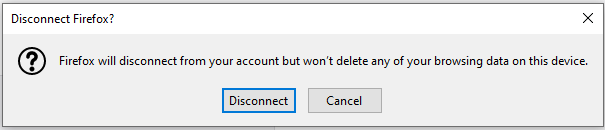
since this is an office computer I really don't want my private data to remain after I desync or unsync my profile from the browser instead I get this message (see attached screenshot) I had to delete the firefox folder from the windows progam folder to keep other users from being able to use my data! Please tell me its a glitch!!
Solução escolhida
You can consider to use a Firefox portable version installed on a USB flash drive.
The portable version comes with its own profile folder and doesn't interfere with currently installed Firefox versions.
Ler esta resposta no contexto 👍 1Todas as respostas (2)
No, this is an intentional change and you can no longer remove data that was downloaded using Sync when you want to end a session.
- Bug 1568357 - Disconnecting Sync has hard-to-parse information leading to user deleting own data
- Bug 1582023 - Replace "sync disconnect" dialog and local data removal with simple confirmation dialog and no data removal
(please do not comment in bug reports
https://bugzilla.mozilla.org/page.cgi?id=etiquette.html)
Solução escolhida
You can consider to use a Firefox portable version installed on a USB flash drive.
The portable version comes with its own profile folder and doesn't interfere with currently installed Firefox versions.