


Adding Bold/Italic/Underline font formatting buttons to message pane
When I want to use a bold font in a new message, it seems that there's only one way to do this:
- Highlight text - Go to "Format" at very top of the pane. - Select "Text style" from the drop down menu. - Select "Bold" from the options.
To simplify the selection of "Bold" is there a way to add a "Bold" (or for that matter "Italic", "Underline") button to the row of buttons appearing immediately before the subject line.
Grateful for any solutions. Enjoying Thunderbird but still finding my way round...
Solução escolhida
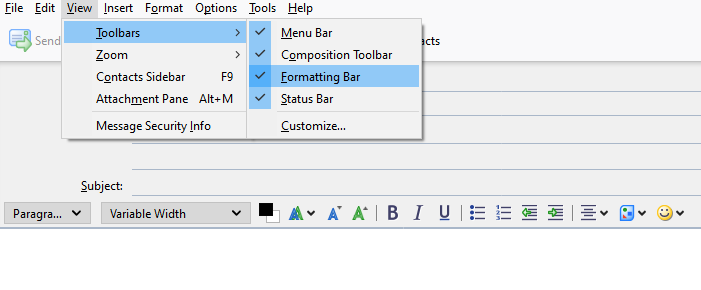
Enable the Formatting Bar under View/Toolbars (see picture). Press Alt if the Menu Bar is hidden.
Ler esta resposta no contexto 👍 1Todas as respostas (3)
Solução escolhida
Enable the Formatting Bar under View/Toolbars (see picture). Press Alt if the Menu Bar is hidden.
Sorted - thank you.
I was "thrown" by the symbols shown on the formatting toolbar - variants of "A" as shown in the attached, rather that the usual B/Bold, I/Italics, U/Underlined.
Much time saved by your kind help!
J

My picture displays B, I and U instead of the default A icons because the Phoenity Icons add-on is installed. I guess the A icons are language neutral, although a better approach would make them conform to the language of TB.