


Mac Thundebird, missing buttons when import contacts

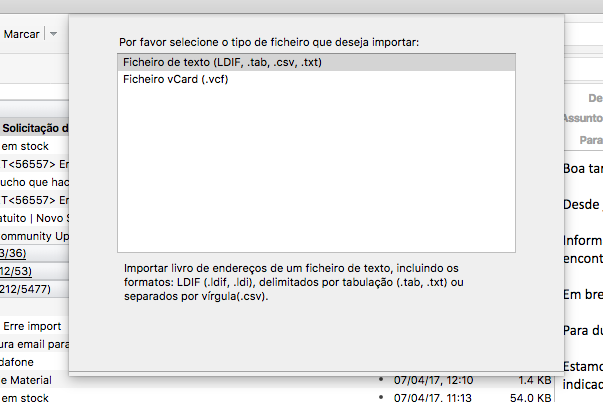
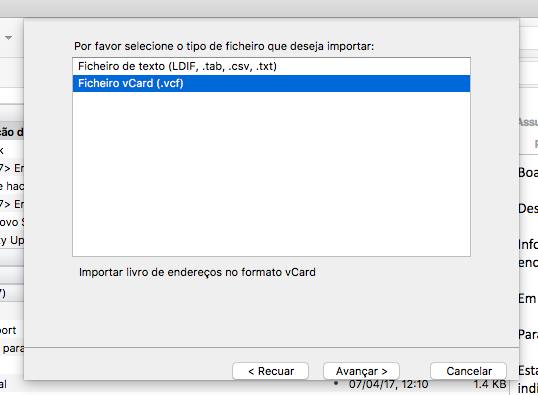
When importing contacts on the Thuderbird Mac Version, the buttons are missing. Cannot import. Only available on the .vcf format. I`m using the latest verision and the Portuguese (Portugal) version. I`ve tried on the Windows Version, and the buttons are available, but also very not the complete button.
Todas as respostas (7)
Thanks, but is not the situation. I've the two situations, fresh instalation and update situation. Always from the Offcial source.
Hello, Even in safe mode doesn`t work. I Think is a bug form this latest version on the Portuguese localization. Like I told, it´s a fresh installation and a update installation, on diferente machines. All running Mac OS 12.12 (Sierra)
A while ago, there was a similar issue with the Options/Preferences window on a Mac.
It is as if your computer font /dpi is too large for the preset window size and so looks like it is clipped.
Have you tried increasing/decreasing the dpi settings on computer to see the effects in Thunderbird Import window?
Possible workaround: The import window is not a window generally used very often, so try the change in computer resolution dpi settings to see if you can that 'Import' window to be good enough with buttons, so you can at least use it. You can always reset dpi resolution afterwards if required.
Please report back on whether this works and what dpi settings helped.
Toad-Hall, I`ve already tried monitor resolutions, but without any positive result.
I insist this situation is a Bug on this version.
I`ve instaled the previous version, works OK, I imported the contacts and update to the last version. The contacts are already there but it´s not possible to import again

zmscosta said
Toad-Hall, I`ve already tried monitor resolutions, but without any positive result. I insist this situation is a Bug on this version. I`ve instaled the previous version, works OK, I imported the contacts and update to the last version. The contacts are already there but it´s not possible to import again
I agree, On 4/25/17 late PM I received a message from Google and they advised someone tried to log in on my acct, so I should change my password.. After that I opened TB & I couldn’t even get any new mail to download. I could open TB but read only previous downloaded mail not send any out. Now my spouse & I use Profile Manager & her g mail email acct works perfectly so my TB program on my pc is not the problem.
This happened because I responded as Google suggested & now I have several days into this. I can now get new downloaded mail, this all started why I don’t know after I opened Tb & it asked for my password & I inputted the new password which did not work several times prior so why now? But I couldn't and still cant send any emails.
To rgh43 Question title: Mac Thundebird, missing buttons when import contacts Your issue has absolutely nothing to do with missing buttons in a MAC OS. Please do not post irrelevant comments in someone else's question. You are sending emails to the original poster of question and they may not want nor know how to assist you and probably would regard you as spamming them with irrelevant reponses to their issue. Please ask your own question in a new question as this will be seen by a larger group of people and you will be more likely to get assistance.