


Windows 10 reached EOS (end of support) on October 14, 2025. If you are on Windows 10, see this article.

Pesquisar no apoio

Evite burlas no apoio. Nunca iremos solicitar que telefone ou envie uma mensagem de texto para um número de telefone ou que partilhe informações pessoais. Por favor, reporte atividades suspeitas utilizando a opção "Reportar abuso".

Saber mais
Arquivadas

Why won't Thunderbird sign me into Gmail when I've created an app password?

Matt replied
greggreggreg

Hello,

I'm trying to add a gmail account to Thunderbird which has two step authentication enabled.

I have generated an application specific password[1], then copied and pasted it into the password field.

When I do this, a Thunderbird window opens with the Google sign in screen, asking for my gmail password.

I tried entering both the account password and app password when this happens, both bring me to a page telling me to enable cookies.

I am at a loss as to what I'm doing wrong. How can I add my Gmail with two step enabled to Thunderbird?

(I'm running OSX 10.10.5 and Thunderbird 45.2.0)

[1] As per instructions here: https://support.google.com/accounts/answer/185833?hl=en

Hello, I'm trying to add a gmail account to Thunderbird which has two step authentication enabled. I have generated an application specific password[1], then copied and pasted it into the password field. When I do this, a Thunderbird window opens with the Google sign in screen, asking for my gmail password. I tried entering both the account password and app password when this happens, both bring me to a page telling me to enable cookies. I am at a loss as to what I'm doing wrong. How can I add my Gmail with two step enabled to Thunderbird? (I'm running OSX 10.10.5 and Thunderbird 45.2.0) [1] As per instructions here: https://support.google.com/accounts/answer/185833?hl=en

Todas as respostas (4)

is the authentication method oauth2.0?

Yes, when I go into advanced it's set to that - is that the correct setting?
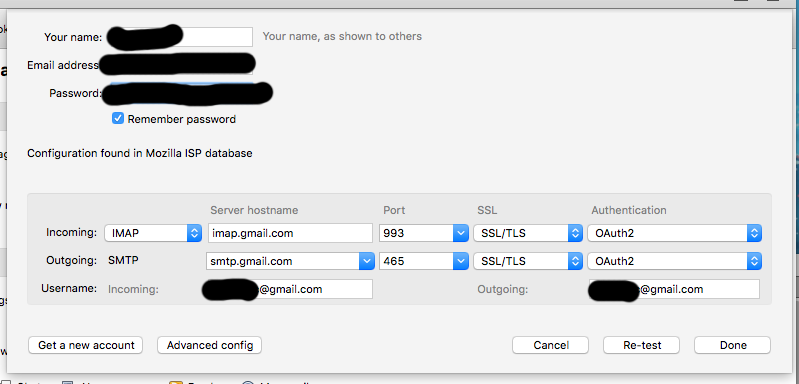
Hi, so I tried switching it "Normal password" and this fixed it!

Thanks for the nudge!

That is because oAuth2.0 should not require an app password, even with two factor authentication.