


BitDefender made all my bookmarks disappear from my Bookmarks Toolbar

My Bookmarks Toolbar is blank [pic - top] And when I try to add a new bookmark, it disappears after I close and open Firefox again
This happened on two computers after I did a OneClick Optimizer using BitDefender Total Security 2016 (Some things that came up include Firefox cache and Firefox cookies issues) [pic bottom left]
In Library (window) > All bookmarks > Bookmarks Toolbar .. all my bookmarks are there from before and after the OneClick Optimizer [pic - bottom right]
How do I make all my bookmarks appear back onto my Bookmarks Toolbar ?
Solução escolhida
You can check for problems with the places.sqlite database (bookmarks, history) in the Firefox profile folder.
- Places Maintenance: https://addons.mozilla.org/firefox/addon/places-maintenance/
See also:
- http://kb.mozillazine.org/Bookmarks_history_and_toolbar_buttons_not_working_-_Firefox
- https://support.mozilla.org/kb/Bookmarks+not+saved#w_fix-the-bookmarks-file
If the Places Maintenance extension can't repair the places.sqlite database then remove all places.sqlite file(s) in the Firefox profile folder to make Firefox rebuild the places.sqlite database from the most recent JSON backup in the bookmarkbackups folder.
If you use Sync then best is to disconnect Sync (temporarily) while performing maintenance/repair efforts to the places.sqlite database.
Todas as respostas (6)

Disable BitDefender, is the problem still there?
You have NVidia’s network access manager or Forceware Network Manager software installed. Disable / remove it. https://support.mozilla.org/en-US/kb/connectivity-crashing-firefox-43-update
I don't have NVIDIA ForceWare Multimedia application
I will try uninstalling BitDefender (I don't see a disable button)
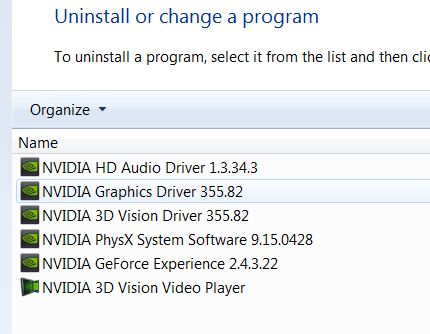
It didn't work Thank you though
FredMcD said
Disable BitDefender, is the problem still there? You have NVidia’s network access manager or Forceware Network Manager software installed. Disable / remove it. https://support.mozilla.org/en-US/kb/connectivity-crashing-firefox-43-update
Solução escolhida
You can check for problems with the places.sqlite database (bookmarks, history) in the Firefox profile folder.
- Places Maintenance: https://addons.mozilla.org/firefox/addon/places-maintenance/
See also:
- http://kb.mozillazine.org/Bookmarks_history_and_toolbar_buttons_not_working_-_Firefox
- https://support.mozilla.org/kb/Bookmarks+not+saved#w_fix-the-bookmarks-file
If the Places Maintenance extension can't repair the places.sqlite database then remove all places.sqlite file(s) in the Firefox profile folder to make Firefox rebuild the places.sqlite database from the most recent JSON backup in the bookmarkbackups folder.
If you use Sync then best is to disconnect Sync (temporarily) while performing maintenance/repair efforts to the places.sqlite database.
I think this worked > Places Maintenance extension Thank you !
cor-el said
You can check for problems with the places.sqlite database (bookmarks, history) in the Firefox profile folder.See also:
- Places Maintenance: https://addons.mozilla.org/firefox/addon/places-maintenance/
- http://kb.mozillazine.org/Bookmarks_history_and_toolbar_buttons_not_working_-_Firefox
- https://support.mozilla.org/kb/Bookmarks+not+saved#w_fix-the-bookmarks-file
If the Places Maintenance extension can't repair the places.sqlite database then remove all places.sqlite file(s) in the Firefox profile folder to make Firefox rebuild the places.sqlite database from the most recent JSON backup in the bookmarkbackups folder.
If you use Sync then best is to disconnect Sync (temporarily) while performing maintenance/repair efforts to the places.sqlite database.
Thank you all for your very quick responses
The Places Maintenance extension seemed to work for me