


Move & Resize Keyboard Commands not working.

For sometime now, I've been unable to use the any of the Halve commands via my keyboard.
Its set to Option + any of the arrow directions, and once it worked just fine but maybe it was after an update for Firefox that it suddenly no longer worked? Granted this same command works fine for other software I have open - Discord, Calendar, Notes, etc.
I'd love to figure out why this command has stopped working or if something is preventing it from working.
All Replies (3)
Penyelesaian Terpilih
What key combo is shown for the actions in the Window › Move & Resize menu?
Mine (default?) are Control + Fn (globe) + arrows:
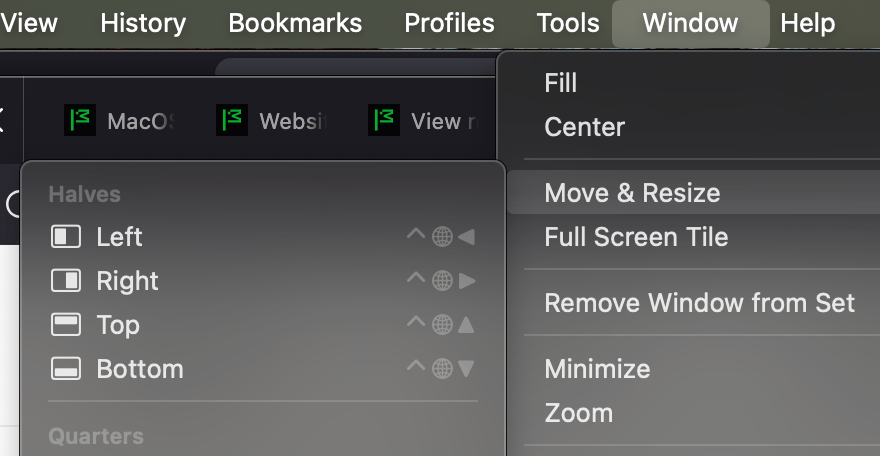
Mine are set as Option + Arrows and worked but have stopped.
Oh I just now went into my keyboard setting a restored the default, it changed the command to what yours is and now when I tried it - it worked!
Huh I wonder why the former command stopped working or maybe it was conflicting with another command. But heck I wish I had just looked at my base settings, still weird it was only firefox that didn't take that command.
Many thanks!
These are handled on the macOS side — there's nothing explicit that would collide with these in Firefox — although Option–arrow on system level means jumping by words in text selection… It's possible when Firefox was focused this combo was getting consumed either into the web content, or the UI (address bar etc.) as they definitely would on inputs or when editing the location.
You can try setting them back to your custom values, to see if something gets overridden that way, but generally I'd get used to the standard ones now since these are provided by the system to be potentially the most reliable combinations these days — as the implicit functionality of the text selection might be conflicting in places.