


"Send to" command in Windows 11 does not work with Thunderbird
Hello This is a Thunderbird on Windows 11 question If I select a file, right click and then click on "Send to" >"Mail Recipient", Windows tell me
There is no email program associated to perform the requested action. Please
install an email program or, if one is already installed, create an association in the
Default Programs control panel.
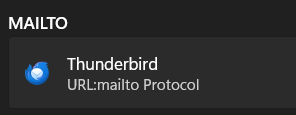
But Thunderbird is installed, up and running and is set as default for MAILTO (see image)
So what could be the problem?
Luckily, files can be loaded into messages using the "Attach" command in Thunderbird if that gives you a clue
Thanks in advance for any help
Penyelesaian Terpilih
All Replies (5)
This is a windows issue. You need to click the 'default apps' app and there declare that Thunderbird is the default email client.
Hello David
But I've already done that too. It's the default app for all the choices offered (.eml .wdseml and URL Mailto protocol)
Or am I missing something?
Dave Neve
Penyelesaian Terpilih
Thanks David
I'm not sure what exactly made the difference as I tried a couple of the suggested solutions at the same time but one or more of them worked
Thanks for the feedback. :)