


Urgent question: Wrong email group when I sign in coming up

My school email's storage and emails will expire end of today (June 30th, 11:59 PM EST). I accidentally thought the account would just be frozen at that time, but realized they would be deleting the account all together for universities alumni.
When I downloaded Thunderbird to transfer my emails, I'm logging in, but I'm getting prompted to log in to Microsoft rather than Gmail for some reason. The email should be Google Workspace. I'd love to know what's going on as I'm not sure and my school's IT support said it's a problem with Thunderbird as it should be gmail for me.
Anyone know of any fixes or suggestions?
All Replies (20)
Did you download from thunderbird.net? Or from Microsoft? The two are not identical. Thunderbird.net is preferred.

Have you set up your gmail account in Thunderbird?
I tried logging into my university’s email like .edu since it’s a Google workspace, it kept taking me to Microsoft for some reason and not letting me do Google as a sign in
If you want to access your gmail/university account in Thunderbird, you must set the account up in Thunderbird. There is no need to sign in to an account on the Web (though the set-up process may require some such sign-in). Is there a reason why you are trying to sign in over the Web?
Oh, you might want to sign in to the Web to export your mail from the gmail account. That would be a good thing to do. Make sure that you request individual mbox files, not all messages in one file.
But why you are asked to sign in to a Microsoft account is a question that the university people will have to answer.
If you are not able to sign in on the Web and export your messages, you can set up your gmail account in Thunderbird and download the messages. If you have thousands of messages, it may take longer than today to download them all.
How do I sign in through web for Thunderbird? I don’t see that option anywhere. If I do that using my school email, will that allow me to sign in through the desktop app? Could I do the web sign in and transfer it online?
One does not sign in through the Web for Thunderbird.
There are two approaches to do what you want to do:
Google Takeout You go to https://takeout.google.com, sign in to your account, and ask for each mailbox/folder/label in gmail to be exported in its own mbox file. I do not use gmail and do not know where this option is. This is the option that you want because it is much quicker than the alternative and you need to get your messages today. You can also have your calendar and contacts exported. Later, you can import all this data into Thundberbird or another e-mail app. I do not know if the nature of your account as an employer's account complicates any of this.
IMAP syncing Set up your gmail account in Thunderbird. Wait for all the messages to synchronize, that is, be downloaded into Thunderbird. This process will take longer, the more messages that you have. You may not have enough time before your account is disabled. When your account is disabled at the university, your messages should be safe on your computer in Thunderbird, if they have all been downloaded. There are some actions to take to ensure that all messages are downloaded and safe.

posted response in error.
Diubah oleh Antonia
You might want to ask your university tech people if they can give you more time.
When I do the iMap, it’s asking me to log in through Microsoft rather than GMail when I put my school email in. My university support said it’s Thunderbird that might have an error on their end. Is there a way to get it to be the Google workspace rather than Microsoft?
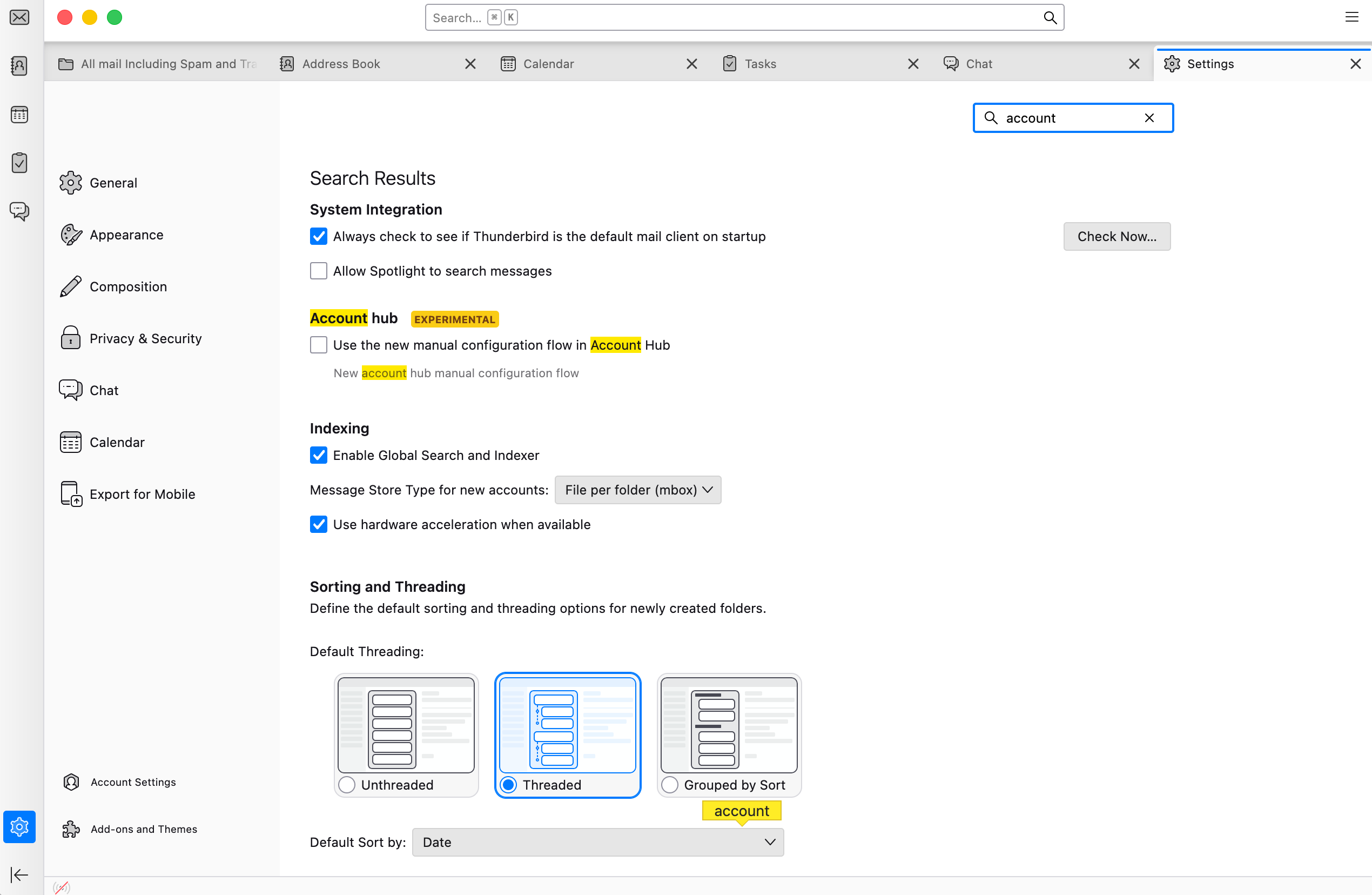
I don't know why it is doing that. Is your school switching from gmail to Microsoft? If you are using the account hub to set up a new account, go into Thunderbird settings > General, disable the account hub, and try again. If you share a screen image of the account set-up window, someone here may be able to help.
Hi, not read all the strings here, but for spped, 1st idea I have is that if you can still log into your gmail account u would set yo a forwarding to your thunderbird account asap, and have all emails fwd that way I am not sure uf you can "archive" in gmail and then import, or export to start As for the "Microsoft" issue, seems that the uni (as they do here in the uk) use some form of authentication, even with a google (gmail) account. That is to protect your Uni account. Your thunderbird app on your device is a "client" and needs to really connect to the uni email "Server" to collect emails. However, i still think your best attack is to fwd from your Uni acc to your new TB account I hope all this makes sense and helps Antony
Hey Rick,
I don't see the disable account hub unless not having it check marked is that.
When I try putting in my school email through microsoft, I'm getting no account found.
Rick recommended Google Takeout. That isn't working? That shouldn't be touching Microsoft.
Unchecked is disabled.
I don’t know what it means to put in your school e-mail through Microsoft. Can you share a screen image of the account set-up window? And an image of what you see after you enter all your account information?
Antony and David, thanks for joining us!
Yeah, takeout is the thing to try first.
its a pity this is at the 11th hr as there are a few things that need to be known to make help more precise - however - hopefully one or two above will help. I am curious why a Uni would use a gmail account setup - i work for one in the UK and we use Outlook, only cos it links to other microsoft apps. I do realise that Google has a host of parallel apps these days, including the Chrome OS. My approach was to look at the prob the quickest/simplest, and that would be the FWD approach, unless one can "archive" all emails and import to TB later. Most practical is mentioned above - IMAP, where TB is the client app and hence you set up the gmail account as part of TB to then pull all emails, (by synchronising), from the gmail server (whatever the Uni is using) This is how I use TB with the Uni and other accounts, gmail, outlook and personal as well.
As with Rick, cos I do not use gmail client/server system (i only use TB to collect) i have no deep knowledge of what can be done on the gmail server side (which you connect to from your browser - prob Chrome in this case) or hoe the Uni in question here has it set up. Unless they use Outlook client app itself but the email address is a gmail(google) one - hence why there is prob an authentication requirement when connecting
Apols long-winded here and hope not too technical (occupational hazard, IT been my area of work for over 45 years, well before DOS, microcobal and CP/M - shock-horror
Anyway, hope you succeed in getting the emails off, but in the end, it remains to you varunchharia to know just how important these emails are.. ( I still have some from way back, prob cant read them now, technology being the prob! 🤔)
Thanks for contributing, Antony!
Forward would forward only future messages, but the account is being disabled, so it won't receive more messages. Google Takeout may be what you have in mind when you think of an archive option.
Rick - re Takeout, prob, never used it! (will research this more, tho be a bit late for this instance) As for FWD, true, in normal operations that is what it would do, I was trying to remember if there was a way to "back" the function. IMAP and use TB to collect and sync would be the best way,