


Since the last update, GMX has been detecting my ad blocker and blocking access to my inbox unless I disable it.

Hi there,
Since the last update, GMX is able to detect my ad blocker and blocking access to my inbox unless I disable the ad blocker. I don't want to disable it. Is there a possibility that you adjust the update or can I do something else? Do other users have the same problems?
Kind regards Eva
All Replies (2)
Can you try using uBlock Origin? https://addons.mozilla.org/en-US/firefox/addon/ublock-origin/
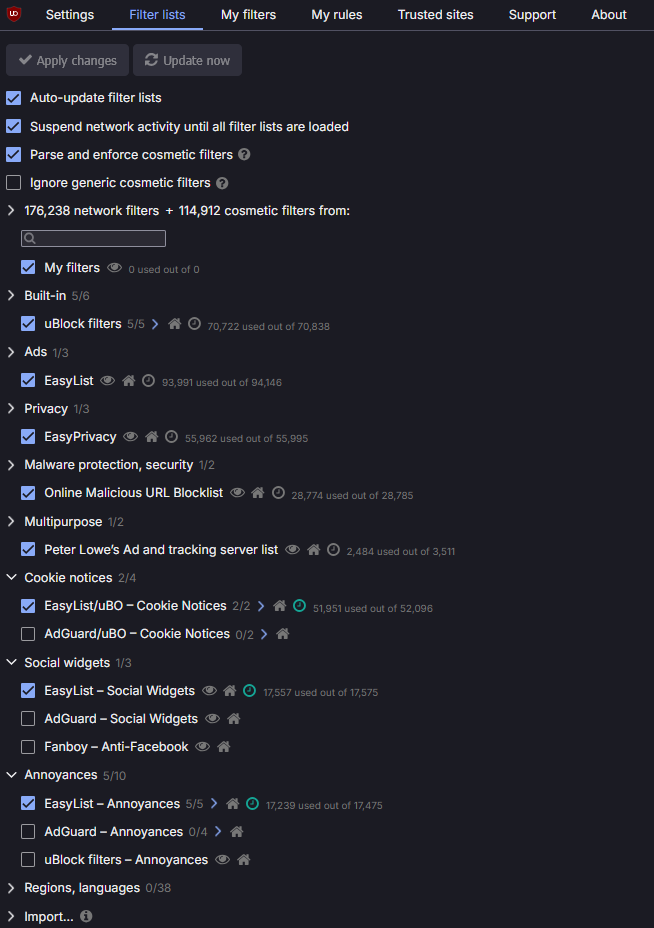
Can you enable the below filter lists settings in the ad-blocker:
Hi Winui64,
Thank you very much for your reply. I disabled Ghostery and installed uBlock Origin, configuring it as shown in your screenshot. Unfortunately, that didn’t change anything—uBlock shows me how many blocks occur when logging into GMX (14 in total), and GMX immediately blocks my free account because of the ad blocker. So I can’t access my account. GMX suggests as a solution that I disable all ad blockers or switch to an ad-free paid version. Any other ideas?