


Fix settings to open local folders get messages

I changed something and lost the upper tab to get messages for "local folders" and the delete button.
NOTE: the upper tab is gone.
Chosen Solution
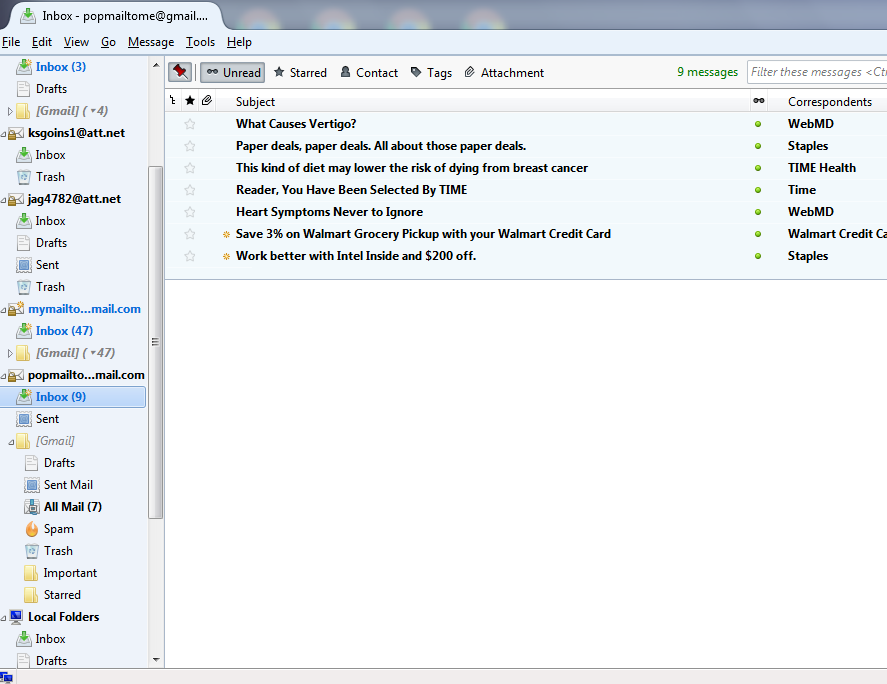
You have 2 things going on. You have lost your Mail Toolbar. Before you lost your Mail Toolbar you clicked Quick Filter.
Click on View-Toolbars and turn the Mail Toolbar back on. Then click the Quick Filter button to get out of the filter view.
എല്ലാ മറുപടികളും (4)
Hello,
In order to better assist you with your issue please provide us with a screenshot. If you need help to create a screenshot, please see How do I create a screenshot of my problem?
Once you've done this, attach the saved screenshot file to your forum post by clicking the Browse... button below the Post your reply box. This will help us to visualize the problem.
Thank you!
Here you go and thanks for the quick reply.
Chosen Solution
You have 2 things going on. You have lost your Mail Toolbar. Before you lost your Mail Toolbar you clicked Quick Filter.
Click on View-Toolbars and turn the Mail Toolbar back on. Then click the Quick Filter button to get out of the filter view.
Thanks airmail, that did it.