Update existing appoint by using updated ics-file

Is there a way to update existing calendar appointments by using an updated ics-file? We have appointments that are placed in the Calendar of Thunderbird, and there need to be modifications made over time. These appointments can be in the past, present, or in the future.
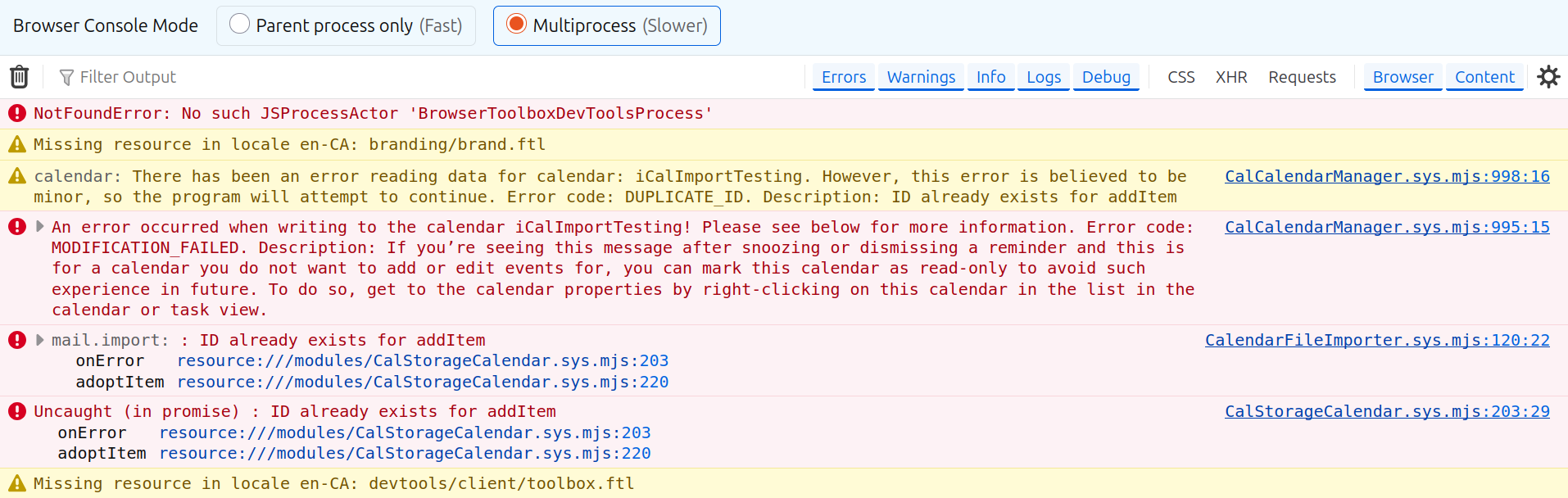
When trying to import a modified file, by just updating 'DESCRIPTION', and using the same ID, Thunderbird throws the error of: mail.import: : ID already exists for addItem
   onError resource:///modules/CalStorageCalendar.sys.mjs:203
   adoptItem resource:///modules/CalStorageCalendar.sys.mjs:220
CalendarFileImporter.sys.mjs:120:22
We need to be able to access the same appointment, and we do that from an external database.
Version: 156.0 (64-bit) snap on Ubuntu 24.04 LTS
All Replies (2)
I do not program with ICS files. But a quick google search indicates that to modify an existing item you need to increase the sequence number used in the ICS file and retain the unique identifier.
Something like this I guess https://stackoverflow.com/questions/45481008/update-and-cancel-outlook-appointment-using-ics-file
Fundamentally your ICS file needs to be correctly formatted, so whomever is maintaining the database and code for exporting the ICS file will need to make suitable updates so the ICS files written are compatible with the standard so items update and not attempt to add again. https://datatracker.ietf.org/doc/html/rfc5545
Trying to update a Thunderbird (156.0 64-bit) on Ubuntu 24.04 appointment, but to no avail just yet.
REFERENCE:
   1. https://stackoverflow.com/questions/44248991/generate-icalendar-file-to-update-existing-event#
   2. https://stackoverflow.com/questions/275759/update-an-event-in-outlook-2007-with-an-icalendar-file
   3. https://icalendar.org/RFC-Specifications/iCalendar-RFC-5545/
   4. https://icalendar.org/validator.html#results
The following example (found @ REFERENCE 2.) suggests that with the same UID, but different Sequence Number, it works on Outlook 2007.
BEGIN:VCALENDAR VERSION:2.0 PRODID:-//WA//FRWEB//EN METHOD:REQUEST BEGIN:VEVENT UID:FRICAL201 SEQUENCE:0 DTSTAMP:20081108T151809Z ORGANIZER:donotreply@test.com DTSTART:20081109T121200 SUMMARY:11/9/2008 12:12:00 PM TRIP FROM JFK AIRPORT (JFK) LOCATION:JFK AIRPORT (JFK) END:VEVENT END:VCALENDAR
Update: BEGIN:VCALENDAR VERSION:2.0 PRODID:-//WA//FRWEB//EN METHOD:REQUEST BEGIN:VEVENT UID:FRICAL201 SEQUENCE:1 DTSTAMP:20081108T161809Z ORGANIZER:donotreply@test.com DTSTART:20081109T121300 SUMMARY:11/9/2008 12:13:00 PM TRIP FROM JFK AIRPORT (JFK) LOCATION:JFK AIRPORT (JFK) END:VEVENT END:VCALENDAR
However, this does not seem to work in Thunderbird, see ScreenShot
Question: How to fix this issue?